
Time to Read:
Table of Contents
Introduction
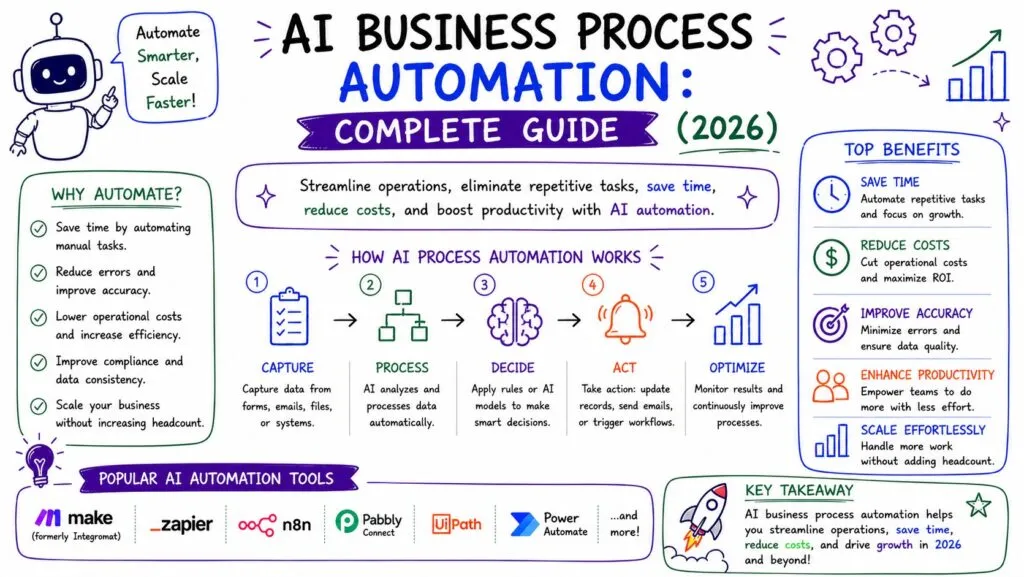
Artificial intelligence is transforming how businesses operate. What once required hours of manual work can now be completed in minutes through intelligent automation. From qualifying leads and processing invoices to resolving customer inquiries and generating reports, AI business process automation enables organizations to work faster, reduce costs, and improve decision-making.
Unlike traditional automation, which follows predefined rules, AI-powered automation can analyze data, recognize patterns, generate content, and make contextual decisions. This allows businesses to automate not only repetitive tasks but also processes that previously required human judgment.
Whether you’re a startup, small business, or enterprise, AI business process automation can help streamline operations across every department.
In this guide, you’ll learn how AI automation works, explore real-world use cases, review recommended software, understand implementation best practices, and calculate the potential return on investment (ROI).
If you’re building an AI-first organization, this guide complements:
- Best AI Workflow Automation Software for Businesses in 2026
- AI Workflow Automation for Small Businesses
- Workflow Automation for Small Businesses: The Complete Guide
- Best AI Workflows for Small Businesses
- What Are AI Agents? A Business Owner’s Guide
What Is AI Business Process Automation?
AI business process automation (AI BPA) combines artificial intelligence with workflow automation to automate business operations that traditionally require manual effort.
Instead of simply executing predefined rules, AI-powered systems can:
- Analyze documents
- Understand natural language
- Generate content
- Predict customer behavior
- Prioritize tasks
- Detect anomalies
- Recommend actions
- Learn from historical data
For example, instead of manually reviewing every customer support request, AI can identify the issue, classify its priority, suggest a response, and route it to the right team automatically.
AI Business Process Automation vs Traditional Automation
| Traditional Automation | AI Business Process Automation |
|---|---|
| Rule-based workflows | Intelligent decision-making |
| Static processes | Adaptive workflows |
| Manual rule updates | Learns from data patterns |
| Limited personalization | Personalized customer interactions |
| Task automation | End-to-end process automation |
Traditional automation improves efficiency, while AI adds intelligence that enables businesses to make faster and more accurate decisions.
Benefits of AI Business Process Automation
Businesses adopting AI automation often experience improvements in multiple areas.
Increased Productivity
Employees spend less time on repetitive work and more time on strategic initiatives.
Lower Operational Costs
Automating manual processes reduces labor costs and minimizes expensive errors.
Better Customer Experience
AI delivers faster responses, personalized interactions, and consistent service across multiple channels.
Faster Decision-Making
Real-time analytics and predictive insights help businesses respond quickly to changing conditions.
Improved Compliance
Automated workflows follow standardized procedures and maintain detailed audit trails.
AI Business Process Automation by Department
1. Sales Automation
Sales teams spend significant time on administrative tasks instead of selling. AI automates repetitive activities while helping sales representatives prioritize high-value opportunities.
Workflow Diagram
Website Visitor
↓
AI Chatbot Qualifies Lead
↓
CRM Contact Created
↓
AI Lead Score Assigned
↓
Sales Representative Notified
↓
Personalized Follow-up Email
↓
Meeting Scheduled
↓
Proposal Generated
↓
Deal Closed
Benefits
- Faster lead response
- Improved lead qualification
- Higher conversion rates
- Reduced manual CRM updates
Related Guide: AI Sales Workflow: The Complete Guide for Modern Businesses
2. HR Automation
Human resources teams manage recruitment, onboarding, leave requests, and employee documentation. AI reduces administrative workload while improving the employee experience.
Workflow Diagram
Job Application Submitted
↓
AI Resume Screening
↓
Candidate Shortlisted
↓
Interview Scheduled
↓
Offer Letter Generated
↓
Employee Onboarding
↓
Training Assigned
↓
Performance Dashboard Updated
Benefits
- Faster hiring
- Better candidate matching
- Reduced paperwork
- Improved onboarding consistency
3. Finance Automation
Finance departments handle invoices, expenses, approvals, and reporting. AI helps automate these repetitive workflows while improving accuracy.
Workflow Diagram
Invoice Received
↓
AI Extracts Data
↓
Expense Categorized
↓
Approval Workflow
↓
Accounting System Updated
↓
Payment Scheduled
↓
Monthly Financial Report Generated
Benefits
- Faster invoice processing
- Reduced data entry
- Improved compliance
- Better financial visibility
Related Guide: AI Workflow for Invoice Processing and Financial Reporting
4. Customer Support Automation
AI helps support teams deliver faster responses while reducing ticket volumes.
Workflow Diagram
Customer Request
↓
AI Chatbot Responds
↓
Issue Resolved?
→ Yes → Conversation Closed
→ No
↓
Ticket Created
↓
AI Categorizes Issue
↓
Support Agent Assigned
↓
Resolution Sent
↓
Customer Feedback Collected
Benefits
- 24/7 support
- Reduced response times
- Higher customer satisfaction
- Lower support costs
Related Guide: AI Workflow for Customer Support Teams
5. Marketing Automation
Marketing teams use AI to automate campaign planning, content creation, email marketing, and reporting.
Workflow Diagram
Campaign Created
↓
AI Generates Content Draft
↓
SEO Optimization
↓
Approval Workflow
↓
Content Published
↓
Email Campaign Triggered
↓
Analytics Dashboard Updated
Benefits
- Faster campaign execution
- Better personalization
- Improved ROI tracking
- Increased marketing productivity
Related Guide: AI Marketing Workflow: The Complete Guide for Business Growth
6. Operations Automation
Operations teams coordinate purchasing, inventory, project management, and reporting. AI helps streamline these processes and reduce delays.
Workflow Diagram
Purchase Request
↓
Inventory Checked
↓
Supplier Selected
↓
Purchase Order Generated
↓
Delivery Tracked
↓
Inventory Updated
↓
Management Dashboard Refreshed
Benefits
- Improved operational efficiency
- Reduced delays
- Better inventory management
- Enhanced visibility
Real-World AI Automation Examples
Example 1: Ecommerce Business
An online retailer automates order confirmations, shipping updates, customer inquiries, and inventory management using AI-powered workflows.
Example 2: Marketing Agency
A marketing agency uses AI to generate content briefs, assign tasks, schedule campaigns, and deliver performance reports automatically.
Example 3: SaaS Company
A SaaS provider automates customer onboarding, product usage monitoring, churn prediction, and renewal reminders.
Example 4: Accounting Firm
An accounting firm automates invoice processing, document classification, expense approvals, and monthly reporting.
How to Implement AI Business Process Automation
Step 1: Identify High-Impact Processes
Focus on repetitive, time-consuming tasks with clear workflows, such as lead management, invoice processing, or customer support.
Step 2: Map Existing Workflows
Document each process, including triggers, actions, decision points, systems involved, and desired outcomes.
Step 3: Choose the Right AI Automation Platform
Select software that integrates with your CRM, ERP, accounting, communication, and project management tools.
Step 4: Start with a Pilot Project
Implement one automation first. Measure results, gather feedback, and refine the workflow before expanding.
Step 5: Scale Across Departments
After validating your initial workflow, extend AI automation to marketing, HR, finance, customer support, and operations.
Recommended AI Business Process Automation Software
| Software | Best For | Key AI Features |
|---|---|---|
| Make | Advanced workflow automation | AI modules, visual workflows |
| Zapier | App integrations | AI Actions, automation builder |
| Microsoft Power Automate | Microsoft organizations | AI Builder, document intelligence |
| Workato | Enterprise automation | AI copilots, orchestration |
| n8n | Developers | AI agents, custom workflows |
| HubSpot | CRM automation | AI sales, marketing, and service tools |
| Airtable | Operations | AI fields, workflow automation |
| ClickUp | Team productivity | AI writing, task automation |
Measuring ROI
Measuring return on investment helps justify AI automation initiatives.
Track These Metrics
- Hours saved per week
- Reduction in manual tasks
- Employee productivity
- Customer response time
- Customer satisfaction (CSAT)
- Sales conversion rate
- Invoice processing time
- Operational costs
- Error rate
- Revenue growth
Example ROI
Before Automation
- 20 hours/week spent processing invoices
- 10 hours/week updating CRM records
- 15 hours/week responding to repetitive customer inquiries
After AI Automation
- Invoice processing reduced by 80%
- CRM updates automated
- AI chatbot resolves 60% of common support requests
Estimated Annual Savings
- More than 2,000 employee hours
- Lower operational costs
- Faster customer response times
- Higher employee productivity
Best Practices
- Start with one department before expanding.
- Standardize workflows before automating them.
- Keep humans involved in strategic decisions.
- Monitor workflow performance regularly.
- Continuously update AI prompts and automation rules.
- Ensure data quality across connected systems.
- Train employees on new workflows.
Common Mistakes to Avoid
Automating Broken Processes
Fix inefficient workflows before introducing AI.
Ignoring Security
Choose platforms with enterprise-grade security, access controls, and compliance certifications.
Expecting Immediate Results
Automation improves over time through optimization and continuous monitoring.
Using Too Many Separate Tools
Build an integrated automation ecosystem instead of isolated solutions.
Frequently Asked Questions
What is AI business process automation?
AI business process automation combines artificial intelligence with workflow automation to streamline business operations, improve efficiency, and reduce manual work.
Which departments benefit most?
Sales, marketing, HR, finance, customer support, and operations all benefit from AI-powered automation.
Is AI business process automation suitable for small businesses?
Yes. Many platforms offer affordable plans and no-code workflow builders designed for startups and small businesses.
What is the best AI automation software?
Popular options include Make, Zapier, Microsoft Power Automate, Workato, n8n, HubSpot, Airtable, and ClickUp. The right choice depends on your existing systems, budget, and technical expertise.
How long does implementation take?
Simple workflows can be implemented in days, while organization-wide automation projects may take several weeks or months depending on complexity.
Final Verdict
AI business process automation is no longer a future initiative—it’s a practical strategy for improving efficiency, reducing costs, and delivering better customer experiences today. By combining AI with workflow automation, businesses can streamline processes across sales, HR, finance, customer support, marketing, and operations without significantly increasing headcount.
The most successful implementations begin with one high-impact workflow, measure results, and expand gradually across the organization. With the right software, well-designed processes, and continuous optimization, AI business process automation can become a foundation for sustainable growth and long-term competitive advantage.