
Time to Read:
Table of Contents
Introduction
An effective knowledge base can reduce support tickets, improve employee productivity, and help customers solve problems without waiting for an agent. As artificial intelligence becomes more capable, knowledge base platforms are evolving from simple document repositories into intelligent systems that can search, summarize, recommend, and answer questions in natural language.
The best AI knowledge base software now combines documentation, AI-powered search, customer self-service, and intelligent automation to deliver a better experience for both employees and customers.
Whether you’re building an internal knowledge base for employees or a customer-facing help center, choosing the right platform can significantly improve knowledge sharing and operational efficiency.
In this guide, we’ll compare the best AI-powered knowledge base software in 2026, explain which platform is best for different use cases, and help you select the right solution for your business.
Looking for broader knowledge management platforms?
Read our Best AI Knowledge Management Software in 2026 comparison.
This article focuses specifically on knowledge base software, while that guide covers complete knowledge management ecosystems.
What Is AI Knowledge Base Software?
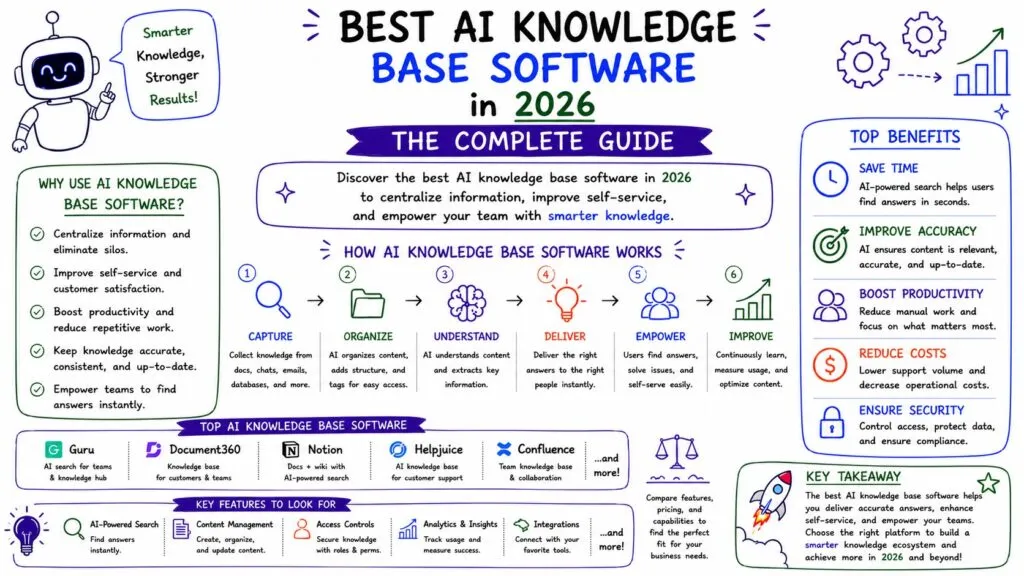
AI knowledge base software helps businesses create, organize, search, and maintain documentation while using artificial intelligence to improve how information is accessed.
Unlike traditional documentation systems, AI-powered knowledge bases can:
- Answer questions using natural language
- Search across thousands of articles
- Recommend relevant documentation
- Summarize long documents
- Detect outdated content
- Generate documentation drafts
- Improve customer self-service
- Assist support agents during conversations
Knowledge bases generally fall into two categories:
Internal Knowledge Bases
Used by employees to access SOPs, policies, onboarding documents, sales playbooks, technical documentation, and operational procedures.
Customer-Facing Knowledge Bases
Used by customers to find answers, troubleshoot issues, read product documentation, and access self-service resources.
Many modern platforms support both.
Why Businesses Need AI Knowledge Bases
Organizations lose significant time when employees or customers struggle to find information.
An AI knowledge base helps businesses:
- Reduce repetitive support tickets
- Improve employee productivity
- Speed up onboarding
- Deliver 24/7 self-service
- Maintain consistent documentation
- Improve customer satisfaction
- Support AI chatbots and AI agents
- Scale support without hiring additional staff
Knowledge bases also become foundational for workflow automation and AI-powered customer service.
Quick Comparison Table
| Platform | Best For | Internal KB | Customer KB | AI Search |
|---|---|---|---|---|
| Document360 | Best overall | ✅ | ✅ | ✅ |
| Zendesk Guide | Customer support | ✅ | ✅ | ✅ |
| Intercom Fin | AI customer support | Limited | ✅ | ✅ |
| Guru | Enterprise knowledge | ✅ | Limited | ✅ |
| Notion AI | Internal documentation | ✅ | Limited | ✅ |
| Confluence + Rovo | Technical teams | ✅ | Limited | ✅ |
| Help Scout Docs | Small businesses | Limited | ✅ | ✅ |
| Freshdesk | Customer self-service | Limited | ✅ | ✅ |
1. Document360 — Best Overall AI Knowledge Base Software
Official Website: https://document360.com/
Best for: Businesses needing both internal and customer-facing knowledge bases.
Document360 is purpose-built for knowledge management and documentation. It supports internal documentation, public help centers, API documentation, product manuals, and AI-powered search.
Its Eddy AI assistant helps generate articles, improve documentation, summarize content, translate knowledge, and provide AI-powered answers.
Key Features
- AI article generation
- AI-powered search
- Customer knowledge base
- Internal documentation
- Documentation analytics
- Version control
- Approval workflows
- API documentation
Pros
- Excellent documentation platform
- Strong AI capabilities
- Supports both internal and external knowledge bases
- Scalable for growing businesses
Cons
- More specialized than general workspace tools
Best For: SaaS companies, customer support teams, software vendors, and documentation-heavy businesses.
2. Zendesk Guide — Best AI Help Center Software
Official Website: https://www.zendesk.com/
Zendesk Guide integrates directly with Zendesk’s customer support ecosystem.
Businesses can create AI-powered help centers, knowledge articles, FAQs, and self-service portals while enabling AI to recommend articles and assist support agents.
Key Features
- AI knowledge suggestions
- Help center
- Community forums
- Article recommendations
- Customer self-service
- AI agent integration
Pros
- Excellent support ecosystem
- Strong customer self-service
- Powerful integrations
Cons
- Best suited to Zendesk users
3. Intercom Fin — Best AI Customer Knowledge Base
Official Website: https://www.intercom.com/
Intercom’s Fin AI agent relies heavily on an organization’s knowledge base to answer customer questions automatically.
Instead of searching documentation manually, customers receive conversational AI responses based on approved knowledge.
Key Features
- AI chatbot
- AI-generated answers
- Knowledge synchronization
- Customer self-service
- Live chat integration
Pros
- Outstanding conversational support
- Excellent AI chatbot integration
Cons
- More customer-focused than internal documentation
4. Guru — Best Internal Knowledge Base
Official Website: https://www.getguru.com/
Guru specializes in helping employees find trusted company knowledge across multiple systems.
Instead of duplicating documentation, Guru connects existing business applications and provides AI-powered answers.
Key Features
- Enterprise search
- Knowledge verification
- AI answers
- Browser extension
- Slack integration
- CRM integrations
Pros
- Excellent internal knowledge
- Strong governance
- Trusted AI responses
Cons
- Less focused on customer-facing documentation
5. Notion AI — Best Flexible Internal Wiki
Official Website: https://www.notion.so/
Notion combines documentation, projects, databases, and AI into one workspace.
Businesses can create internal knowledge bases, SOP libraries, onboarding guides, project documentation, and company wikis.
Key Features
- AI writing
- Enterprise search
- Internal wiki
- Databases
- Documentation templates
- Team collaboration
Pros
- Extremely flexible
- Easy collaboration
- Modern interface
Cons
- Requires thoughtful organization as content grows
6. Confluence + Rovo — Best for Technical Documentation
Official Website: https://www.atlassian.com/software/confluence
Confluence remains one of the most popular documentation platforms for engineering and IT teams.
With Rovo AI, businesses can search technical documentation, generate summaries, and retrieve answers from company knowledge.
Key Features
- Technical documentation
- AI search
- Product documentation
- Team collaboration
- Jira integration
Pros
- Excellent technical documentation
- Strong engineering workflows
Cons
- Can be complex for non-technical teams
7. Help Scout Docs — Best for Small Business Help Centers
Official Website: https://www.helpscout.com/
Help Scout Docs enables businesses to build customer-facing knowledge bases alongside shared inboxes and support tools.
Its AI features help agents draft responses while customers benefit from searchable documentation.
Pros
- Easy implementation
- Affordable
- Strong customer support focus
Cons
- Limited enterprise functionality
8. Freshdesk Knowledge Base — Best Budget AI Help Center
Official Website: https://www.freshworks.com/freshdesk/
Freshdesk combines ticket management with AI-powered knowledge bases, Freddy AI, and customer self-service.
Key Features
- Knowledge base
- AI search
- Ticket deflection
- Customer portal
- Support automation
Pros
- Great value
- Good AI features
Cons
- Advanced AI features require higher plans
Best Knowledge Base Software by Use Case
| Use Case | Recommended Platform |
|---|---|
| Overall Winner | Document360 |
| Customer Help Center | Zendesk Guide |
| AI Customer Support | Intercom Fin |
| Internal Knowledge | Guru |
| Small Businesses | Notion AI |
| Technical Teams | Confluence |
| Budget-Friendly Help Desk | Freshdesk |
| SMB Customer Support | Help Scout |
Internal vs Customer Knowledge Base
Internal Knowledge Base
Designed for employees.
Typical content includes:
- SOPs
- HR policies
- Sales playbooks
- Product documentation
- Internal processes
- Onboarding materials
- Compliance documentation
Customer Knowledge Base
Designed for customers.
Typical content includes:
- FAQs
- Troubleshooting guides
- Product manuals
- Tutorials
- Setup instructions
- Release notes
Many businesses maintain both using the same platform.
Example AI Knowledge Base Workflow
New Product Feature Released
↓
Documentation Draft Created
↓
Technical Review
↓
Published to Knowledge Base
↓
AI Indexes Content
↓
Customer Searches
↓
AI Returns Answer
↓
Support Ticket Avoided
↓
Customer Feedback Collected
↓
Knowledge Article Updated
How to Choose AI Knowledge Base Software
Choose Based on Audience
Internal documentation and customer self-service have different requirements.
Evaluate AI Search
Natural-language search should retrieve accurate, permission-aware answers.
Consider Integrations
Look for CRM, help desk, Slack, Microsoft Teams, Jira, and Google Workspace integrations.
Review AI Capabilities
Prioritize platforms that offer:
- AI search
- AI writing
- Article recommendations
- Content summaries
- AI-generated answers
- Chatbot integrations
Think About Scalability
Your documentation needs will grow as your business expands.
Choose software that supports long-term growth.
Frequently Asked Questions
What is AI knowledge base software?
AI knowledge base software helps businesses create, organize, search, and maintain documentation using artificial intelligence.
Which AI knowledge base software is best?
Document360 is one of the strongest all-around options, while Zendesk Guide excels for customer support, Guru for internal knowledge, and Notion AI for flexible documentation.
Can AI create knowledge base articles?
Yes. Many modern platforms can generate drafts, summarize content, improve documentation, and recommend updates. Human review is still important before publishing.
What’s the difference between knowledge management software and knowledge base software?
Knowledge base software focuses on storing and retrieving documentation, while knowledge management software covers the broader lifecycle of capturing, governing, sharing, and maintaining organizational knowledge.
Is AI knowledge base software suitable for small businesses?
Yes. Platforms such as Notion AI, Help Scout Docs, Freshdesk, and Document360 offer solutions that work well for small and growing businesses.
Final Verdict
AI knowledge base software has become a critical component of modern business operations. Whether you’re enabling customer self-service, reducing support workloads, or improving internal collaboration, the right platform can dramatically improve how knowledge is created and shared.
For organizations seeking a dedicated knowledge base platform, Document360 is our top recommendation thanks to its balance of AI-powered documentation, intelligent search, governance, and customer-facing capabilities. Businesses invested in customer support ecosystems should consider Zendesk Guide or Intercom Fin, while Guru and Notion AI are excellent choices for internal knowledge sharing.
Rather than selecting software based solely on features, choose a platform that aligns with your documentation strategy, support processes, and long-term AI automation goals.