
Time to Read:
Table of Contents
Introduction
Small businesses are expected to do more with fewer resources than ever before. Business owners and lean teams often juggle sales, marketing, customer service, finance, operations, and administrative work—all while trying to grow revenue. As customer expectations increase and competition intensifies, relying on manual processes can slow growth and create costly bottlenecks.
This is where AI workflow automation for small businesses becomes a game changer.
Unlike traditional automation, which follows predefined rules, AI workflow automation combines artificial intelligence with business process automation to make workflows smarter. AI can analyze customer behavior, prioritize leads, personalize communications, summarize data, predict outcomes, and trigger actions automatically based on real-time information.
Whether you’re running a local business, ecommerce store, marketing agency, consulting firm, or SaaS startup, AI-powered automation helps you reduce repetitive work, improve operational efficiency, and deliver a better customer experience.
This guide explains how AI workflow automation works, highlights practical business use cases, recommends leading platforms, and provides a step-by-step implementation framework.
If you’re building a complete AI-powered business, this guide complements:
- Workflow Automation for Small Businesses: The Complete Guide
- Best AI Workflows for Small Businesses
- AI Marketing Workflow: The Complete Guide for Business Growth
- AI Sales Workflow: The Complete Guide for Modern Businesses
- How Small Businesses Can Save 20 Hours Per Week Using AI
What Is AI Workflow Automation?
AI workflow automation combines artificial intelligence with workflow automation software to streamline business processes that traditionally require manual effort.
Instead of simply moving information between applications, AI-enabled workflows can:
- Analyze incoming data
- Make intelligent decisions
- Classify requests
- Generate content
- Predict customer needs
- Prioritize tasks
- Recommend actions
- Trigger automated workflows
For example, instead of assigning every new lead to a salesperson, AI can evaluate the lead’s behavior, score its quality, and automatically assign it to the most appropriate sales representative.
AI Workflow Automation vs Traditional Automation
| Traditional Automation | AI Workflow Automation |
|---|---|
| Rule-based | Learns from data and context |
| Fixed processes | Adaptive workflows |
| Manual decision rules | AI-assisted decision-making |
| Simple task execution | Predictive recommendations |
| Limited personalization | Dynamic, personalized experiences |
Traditional automation is ideal for repetitive tasks, while AI automation adds intelligence that helps businesses make faster and more informed decisions.
Benefits of AI Workflow Automation
Save Time
Automate repetitive activities such as data entry, email follow-ups, scheduling, and reporting.
Increase Productivity
Employees can focus on strategic work instead of routine administrative tasks.
Improve Customer Experience
AI delivers faster responses, personalized recommendations, and proactive communication throughout the customer journey.
Reduce Errors
Automation minimizes manual data entry and improves process consistency.
Scale Business Operations
As your business grows, AI workflows handle increasing workloads without requiring proportional increases in staffing.
Business Processes You Can Automate with AI
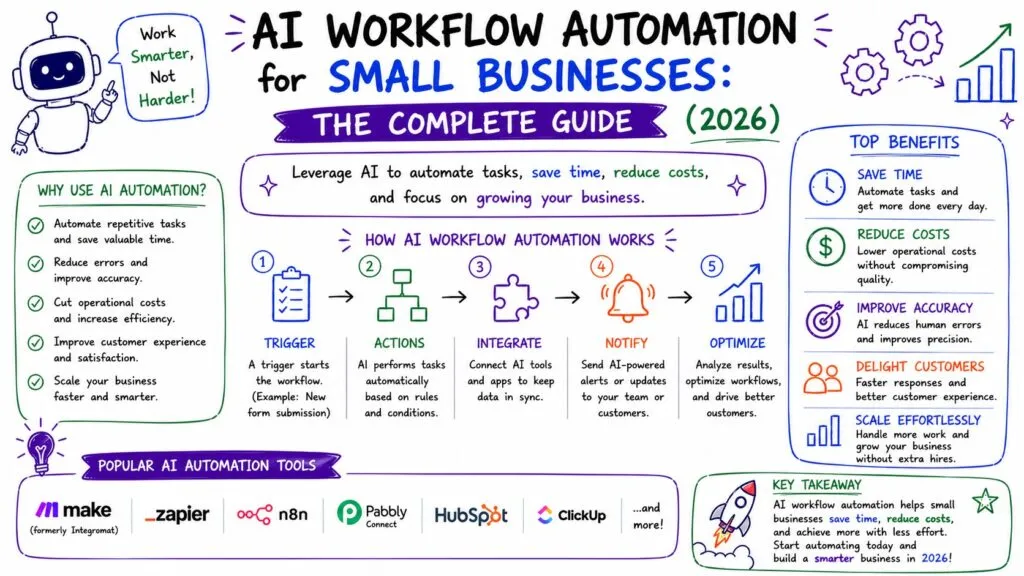
1. Marketing
AI can automate:
- Content planning
- Keyword research
- Email campaigns
- Social media scheduling
- Lead nurturing
- Campaign reporting
Related guide:
AI Marketing Workflow: The Complete Guide for Business Growth
2. Sales
AI sales workflows help businesses:
- Qualify leads
- Score prospects
- Schedule meetings
- Generate proposals
- Update CRM records
- Send follow-up emails
Learn more:
AI Sales Workflow: The Complete Guide for Modern Businesses
3. Customer Success
AI automates:
- Customer onboarding
- Health score monitoring
- Renewal reminders
- Churn prediction
- Customer feedback collection
These workflows improve retention while reducing manual effort.
4. Customer Support
Support teams can automate:
- Ticket routing
- AI chatbots
- Knowledge base suggestions
- Customer responses
- Escalation workflows
5. Finance
AI-powered finance workflows include:
- Invoice generation
- Expense categorization
- Payment reminders
- Financial reporting
- Cash flow forecasting
Example AI Workflow Automation
Lead Generation Workflow
Website Visitor
↓
AI Chatbot Answers Questions
↓
Lead Form Submitted
↓
CRM Updated Automatically
↓
AI Lead Score Assigned
↓
Sales Representative Notified
↓
Personalized Email Sequence
↓
Meeting Scheduled
↓
Proposal Generated
↓
Customer Onboarded
This workflow connects marketing, sales, and customer success into a seamless process while reducing manual intervention.
Best AI Workflow Automation Software
| Platform | Best For | AI Features |
|---|---|---|
| Make | Advanced automation | AI modules and multi-step workflows |
| Zapier | App integrations | AI-powered workflow builder |
| n8n | Technical users | AI agents and custom workflows |
| HubSpot | CRM automation | AI sales, marketing, and service tools |
| Microsoft Power Automate | Microsoft ecosystem | AI Builder and document processing |
| ClickUp | Project management | AI writing, task automation |
| Airtable | Business operations | AI fields and workflow automation |
| Notion AI | Documentation | AI writing and knowledge management |
Choose software based on your existing tools, technical expertise, and automation requirements.
How to Implement AI Workflow Automation
Step 1: Identify Repetitive Tasks
Review daily operations and identify activities that consume significant time without requiring complex decision-making.
Examples include:
- Sending follow-up emails
- Updating CRM records
- Creating invoices
- Scheduling meetings
- Assigning support tickets
Step 2: Document Existing Processes
Map each workflow before automating it.
Identify:
- Trigger
- Actions
- Decision points
- Systems involved
- Desired outcome
Step 3: Select the Right Platform
Choose software that integrates with your CRM, accounting tools, marketing software, communication platforms, and project management systems.
Step 4: Add AI Capabilities
Enhance workflows with AI features such as:
- Content generation
- Lead scoring
- Predictive analytics
- Document summarization
- Customer sentiment analysis
- Intelligent routing
Step 5: Measure and Optimize
Monitor workflow performance using metrics such as:
- Time saved
- Error reduction
- Customer response times
- Lead conversion rates
- Customer satisfaction
- Employee productivity
Regular optimization ensures your automations continue to support changing business needs.
AI Workflow Automation Examples
Marketing
Automatically generate blog outlines, optimize content for SEO, schedule social media posts, and email subscribers after publishing new content.
Sales
Use AI to score leads, recommend follow-up actions, create personalized proposals, and update CRM records.
Customer Success
Track customer health scores, trigger onboarding emails, identify churn risks, and schedule renewal reminders.
Finance
Automate invoice creation, categorize expenses, reconcile payments, and generate monthly reports.
HR
Screen resumes, schedule interviews, send onboarding documents, and assign employee training modules.
Best Practices
Start Small
Automate one process first, then expand gradually as your team gains experience.
Keep Humans Involved
AI should support employees, especially for customer-facing decisions and strategic planning.
Prioritize Integrations
Connected systems eliminate duplicate work and improve data accuracy.
Review Workflows Frequently
Business processes evolve, so regularly evaluate automation rules, AI prompts, and workflow performance.
Common Mistakes to Avoid
Automating Inefficient Processes
Fix process issues before introducing automation.
Ignoring Data Quality
AI performs best when it’s trained on accurate, consistent data.
Using Too Many Tools
A smaller, well-integrated technology stack is easier to manage and maintain.
Forgetting Security
Protect customer information by using trusted platforms and implementing appropriate access controls.
Frequently Asked Questions
What is AI workflow automation?
AI workflow automation combines artificial intelligence with business process automation to automate repetitive tasks while making intelligent decisions based on data and context.
How does AI improve workflow automation?
AI adds capabilities such as predictive analytics, lead scoring, content generation, document summarization, and personalized customer interactions.
Which businesses benefit from AI workflow automation?
Small businesses, agencies, ecommerce companies, SaaS providers, consultants, healthcare organizations, and professional service firms can all benefit.
What are the best AI workflow automation platforms?
Popular options include Make, Zapier, HubSpot, Microsoft Power Automate, ClickUp, Airtable, n8n, and Notion AI.
Is AI workflow automation expensive?
Many platforms offer free or affordable plans for small businesses. Starting with one automated workflow can deliver significant time savings and a strong return on investment.
Final Verdict
AI workflow automation is helping small businesses operate more efficiently by combining intelligent decision-making with process automation. Instead of spending valuable time on repetitive tasks, business owners and employees can focus on innovation, customer relationships, and strategic growth.
The most successful automation strategies start with a single high-impact process—such as lead management, customer onboarding, or marketing automation—and gradually expand into interconnected workflows across the organization. By integrating AI-powered tools with CRM, project management, finance, and communication platforms, businesses can create a scalable automation ecosystem that supports sustainable growth.