
Time to Read:
Table of Contents
Introduction
Standard operating procedures are essential for businesses that want employees to perform recurring tasks consistently. Yet creating SOPs manually is often slow: someone must observe the process, document every step, capture screenshots, format the instructions, review the document, and keep it updated.
An AI SOP generator can dramatically simplify this process.
Modern AI SOP software can turn written instructions, process notes, meeting transcripts, or recorded workflows into structured documentation. Some tools can even capture a process while an employee performs it and automatically create step-by-step instructions with screenshots.
For growing businesses, this makes SOP automation particularly valuable for employee onboarding, internal documentation, customer support, operations, sales, HR, and software training.
This guide explains how AI SOP generators work, how to create better procedures with AI, which tools to consider, and how to connect SOP creation with your broader business automation strategy.
If you’re developing a company knowledge system, also read our guide to Best AI Documentation Tools for Businesses, which compares platforms for managing documentation after it has been created.
What Is an AI SOP Generator?
An AI SOP generator is software that uses artificial intelligence to help create structured standard operating procedures from information about an existing business process.
Depending on the tool, input might include:
- A written process description
- Bullet-point notes
- Existing documentation
- A screen recording
- Employee actions captured in real time
- Video or audio
- Meeting transcripts
- Process templates
The software then converts that information into organized documentation containing elements such as objectives, responsibilities, prerequisites, numbered instructions, screenshots, warnings, checklists, and related resources.
For example, Scribe can capture a digital process as an employee performs it and automatically produce a step-by-step guide containing screenshots and written instructions.
That fundamentally changes SOP creation from:
Remember process → manually write instructions → capture screenshots → format document
to:
Perform/capture process → AI creates draft → human verifies → publish
Why Businesses Need SOP Automation
SOPs become increasingly important as a business grows.
When important processes exist only in employees’ heads, organizations can face inconsistent execution, slower onboarding, repeated questions, and knowledge loss when employees leave.
Well-maintained SOPs provide a repeatable reference for how work should be completed.
Faster Employee Onboarding
Instead of repeatedly explaining routine processes to each new employee, businesses can provide standardized procedures covering software, policies, approvals, reporting, and recurring tasks.
Consistent Processes
An approved SOP gives employees a shared reference rather than relying on different verbal explanations.
Faster Documentation
AI reduces the blank-page problem. Employees can document the process they already know and use AI to transform that knowledge into a structured first draft.
Easier Knowledge Transfer
When experienced employees document their processes, critical operational knowledge becomes organizational knowledge rather than remaining with one person.
Better Foundation for Automation
Documenting a process also exposes its triggers, actions, decision points, exceptions, and dependencies—the same information required to automate it.
This makes SOP creation a natural first step toward AI business process automation.
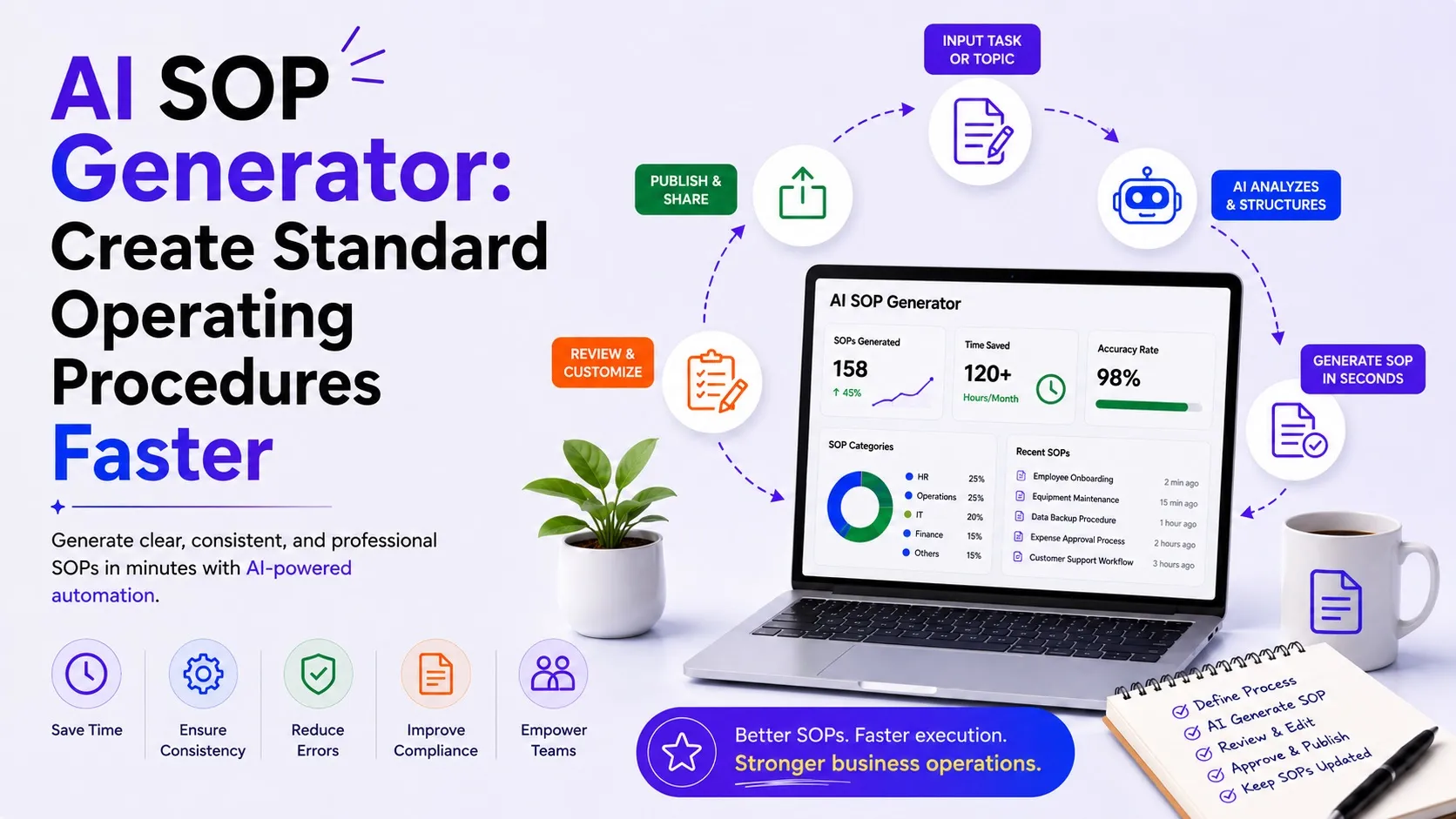
How an AI SOP Generator Works
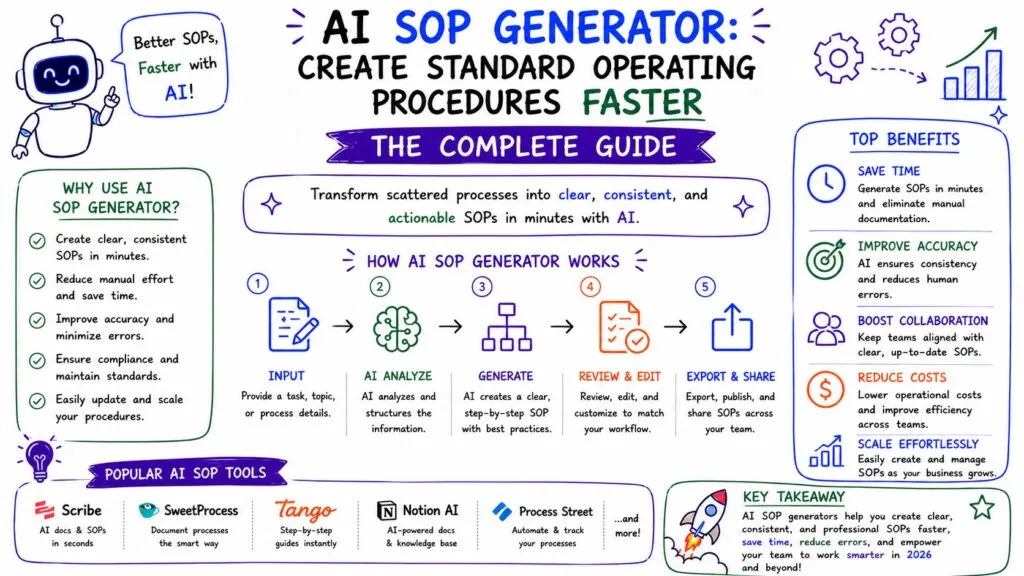
The exact workflow depends on the software, but most implementations follow five stages.
Step 1: Capture the Process
Start with the actual process rather than asking AI to invent how your company operates.
For a software-based procedure, an employee might perform the task while a capture tool records each action.
For an offline process, you could provide:
- Existing notes
- Voice transcripts
- Checklists
- Interviews with process owners
- Current documentation
Step 2: AI Structures the Information
The AI converts the source material into a logical procedure.
A useful structure might include:
SOP Title
Purpose
Scope
Responsible Role
Prerequisites
Procedure
- Step one
- Step two
- Decision point
- Exception handling
- Completion check
Quality Controls
Related Documents
Owner
Last Reviewed
Step 3: Add Supporting Visuals
For software procedures, screenshots can make instructions considerably easier to follow.
Capture-based platforms such as Scribe automatically generate visual step-by-step documentation while a process is being performed.
Step 4: Human Review
This is one of the most important stages.
AI should create the draft, not determine your company’s actual operating policy.
The process owner should verify:
- Steps are in the correct order
- No actions are missing
- Permissions are accurate
- Exceptions are documented
- Compliance requirements are correct
- Screenshots match the current interface
- Responsibilities are clearly assigned
Step 5: Publish and Maintain
Once approved, store the SOP in a searchable knowledge system such as Notion, Confluence, Guru, Document360, Slite, or another documentation platform.
Assign an owner and review date so procedures don’t quietly become outdated.
AI SOP Automation Workflow
A scalable process can look like this:
Employee Performs Process
↓
Process Captured
↓
AI Generates SOP Draft
↓
Steps + Screenshots Organized
↓
Process Owner Reviews
↓
Corrections Made
↓
Manager Approves
↓
SOP Published to Knowledge Base
↓
New Employees Use SOP
↓
Process Changes
↓
SOP Reviewed and Updated
This creates a continuous documentation lifecycle instead of treating SOP creation as a one-time project.
Best AI SOP Generator Tools
Different tools solve different parts of the SOP problem.
| Tool | Best For | Primary Approach |
|---|---|---|
| Scribe | Software processes | Screen capture → SOP |
| Guidde | Video documentation | Workflow → AI video guide |
| Trainual | Employee onboarding | SOPs + training |
| Notion AI | Flexible written SOPs | AI-assisted documentation |
| Process Street | Recurring procedures | Process/workflow management |
| Document360 | Centralized documentation | Knowledge base + AI |
1. Scribe — Best for Automatically Capturing Processes
Scribe is particularly useful when the SOP describes a digital process.
Instead of manually taking screenshots and writing each instruction, an employee performs the process while Scribe captures it. The platform then generates a visual step-by-step guide that can be edited, shared, embedded, or exported.
Best for:
- Software tutorials
- Employee onboarding
- CRM procedures
- Administrative workflows
- Customer training
2. Guidde — Best for Video SOPs
Guidde focuses more heavily on video-based documentation. Its platform supports AI-generated video documentation and voiceovers, making it useful when employees benefit from seeing a process demonstrated rather than only reading instructions.
Best for:
- Software training
- Customer tutorials
- Employee onboarding
- Visual process documentation
3. Trainual — Best for SOP-Based Employee Training
Trainual is better suited to businesses that want to connect documented processes with employee training.
Instead of merely creating a procedure and storing it somewhere, businesses can organize policies, responsibilities, training material, and operational knowledge within an onboarding environment.
Best for: Growing businesses formalizing employee onboarding and training.
4. Notion AI — Best for Flexible SOP Libraries
Notion is useful when a business wants SOPs to live alongside company documentation, databases, project information, and internal knowledge.
AI can assist with drafting, rewriting, summarizing, and organizing process documentation.
Best for: Startups, agencies and small businesses building centralized internal documentation.
5. Process Street — Best for Turning SOPs Into Repeatable Workflows
Traditional SOPs explain what employees should do. Process-management software can go further by turning those instructions into repeatable operational workflows.
This approach works particularly well for processes involving approvals, assignments, recurring checklists, and multiple stakeholders.
6. Document360 — Best for Structured Knowledge Bases
Document360 is useful for businesses managing a larger documentation environment, particularly when SOPs sit alongside product documentation, employee knowledge, or customer-facing resources.
For a broader comparison, see Best AI Documentation Tools for Businesses.
Example: Using AI to Create an Employee Onboarding SOP
Consider a growing company that needs to standardize employee onboarding.
Without an SOP, HR might manually remember to:
- Create company accounts
- Request equipment
- Send policies
- Schedule orientation
- Assign training
- Introduce managers
- Configure software access
With AI process documentation, the company can first capture the current onboarding procedure and turn it into a structured SOP.
The finished workflow might become:
Offer Accepted
↓
HR Creates Employee Record
↓
IT Account Request Submitted
↓
Equipment Prepared
↓
Welcome Materials Sent
↓
First-Day Meetings Scheduled
↓
Training Assigned
↓
Manager Completes 30-Day Review
Once documented, parts of that SOP can potentially be automated using workflow platforms.
That is where documentation begins connecting with the strategies covered in Best AI Workflow Automation Software for Businesses and AI Business Process Automation: Complete Guide.
SOPs vs Automated Workflows
These concepts are related but not identical.
An SOP documents how a process should happen.
An automated workflow executes some or all of that process automatically.
For example:
SOP: When a new customer signs, create their CRM account, send a welcome email, create an onboarding project, and notify the customer success manager.
Automation: HubSpot triggers Make, which creates the project, sends the appropriate data, and notifies the team automatically.
Documenting the process first helps businesses determine which steps should remain human and which can safely be automated.
Best Practices for AI-Generated SOPs
Never Publish the First AI Draft
Verify procedures against the way work is actually performed.
Use Clear, Action-Oriented Steps
Each instruction should tell employees exactly what action to perform.
Document Decision Points
Don’t only document the ideal path. Include what employees should do when something goes wrong.
Assign an SOP Owner
Every important procedure should have someone responsible for keeping it current.
Add Review Dates
Review critical procedures whenever the underlying process, software, regulation, or organizational responsibility changes.
Keep Sensitive Information Out of Prompts
Don’t paste passwords, API keys, private customer data, or other confidential information into AI systems unless your organization’s approved configuration permits that use.
Frequently Asked Questions
What is an AI SOP generator?
An AI SOP generator uses artificial intelligence to help turn process information, notes, recordings, or employee actions into structured standard operating procedures.
Can AI write standard operating procedures?
Yes. AI can create an initial SOP from information about a process. However, someone who understands the actual procedure should verify the document before employees rely on it.
What is the best AI SOP generator?
The best choice depends on the use case. Scribe is strong for capturing software processes, Guidde emphasizes video documentation, Trainual combines SOPs with employee training, and Notion AI works well for flexible internal documentation.
Can SOP creation be automated?
Much of the creation process can be automated, including capturing actions, generating instructions, creating screenshots, formatting documentation, and publishing drafts. Approval and accuracy checks should generally remain human-controlled.
How can businesses use AI SOPs for onboarding?
Businesses can create standardized procedures covering account setup, software access, training, recurring responsibilities, company processes, and role-specific tasks. New employees can then use the SOP library as a self-service reference.
Final Verdict
An AI SOP generator can turn one of the most neglected business activities—process documentation—into a much faster and more repeatable workflow.
For digital processes, capture-first tools such as Scribe can eliminate much of the manual screenshot and instruction-writing work. Guidde provides a more visual approach through AI-powered video documentation, while Trainual connects SOPs with employee onboarding. Businesses wanting flexible written documentation can use Notion AI, while more structured knowledge and process platforms can help manage procedures as the organization grows.
The larger opportunity, however, goes beyond generating documents.
Once your company has clearly documented how sales, HR, finance, support, marketing, and operations actually work, those SOPs become a blueprint for automation. Businesses can identify repetitive steps, connect applications, introduce AI agents, and gradually transform written procedures into intelligent workflows.
That makes AI process documentation an important foundation for building a more scalable AI-powered business.