
Time to Read:
Table of Contents
Introduction
Business knowledge rarely stays in one place.
Standard operating procedures may live in Notion, product documentation in Confluence, customer information in a CRM, files in Google Drive, and important decisions inside Slack or Microsoft Teams. As a company grows, employees can spend significant time simply trying to find the right information.
The best AI knowledge management software solves this problem by making organizational knowledge easier to capture, organize, search, maintain, and use.
Unlike traditional knowledge management software that primarily stores documents, today’s AI-powered platforms can answer natural-language questions, summarize information, search connected applications, generate documentation, and help teams identify outdated knowledge. Enterprise platforms are also increasingly connecting knowledge with AI agents and automated workflows.
In this guide, we’ll compare eight leading AI knowledge management tools in 2026 and explain which platform is best for different business requirements.
For businesses building a broader AI technology stack, see our Best AI Tools for Business guide and Best AI Workflow Automation Software for Businesses comparison.
What Is AI Knowledge Management Software?
AI knowledge management software uses artificial intelligence to help organizations capture, organize, retrieve, maintain, and share business knowledge.
A traditional internal wiki generally requires employees to know where information lives and search for the right document.
An AI knowledge base changes the experience.
Instead of navigating several folders looking for an expense policy, an employee could ask:
“Which business expenses require manager approval?”
The AI searches authorized company knowledge and returns a relevant answer based on available sources.
Modern platforms can include:
- Natural-language search
- AI-generated answers
- Enterprise search
- Internal wikis
- SOP management
- AI-assisted documentation
- Connected data sources
- Knowledge verification
- Permission-aware retrieval
- AI agents
- Content summaries
- Documentation analytics
The result is not simply another document repository. A good knowledge management platform makes company information easier to find and use.
Best AI Knowledge Management Software: Quick Comparison
| Platform | Best For | Key Strength |
|---|---|---|
| Notion AI | Best overall for SMBs | Workspace + knowledge + AI |
| Guru | Enterprise knowledge | AI search and knowledge governance |
| Glean | Enterprise search | Search across business applications |
| Confluence + Rovo | Product & technical teams | Atlassian knowledge ecosystem |
| Document360 | Structured knowledge bases | AI-native documentation |
| Slite | Internal knowledge | Knowledge maintenance |
| Tettra | Smaller teams | Simple internal wiki |
| SharePoint + Copilot | Microsoft businesses | Microsoft 365 knowledge ecosystem |
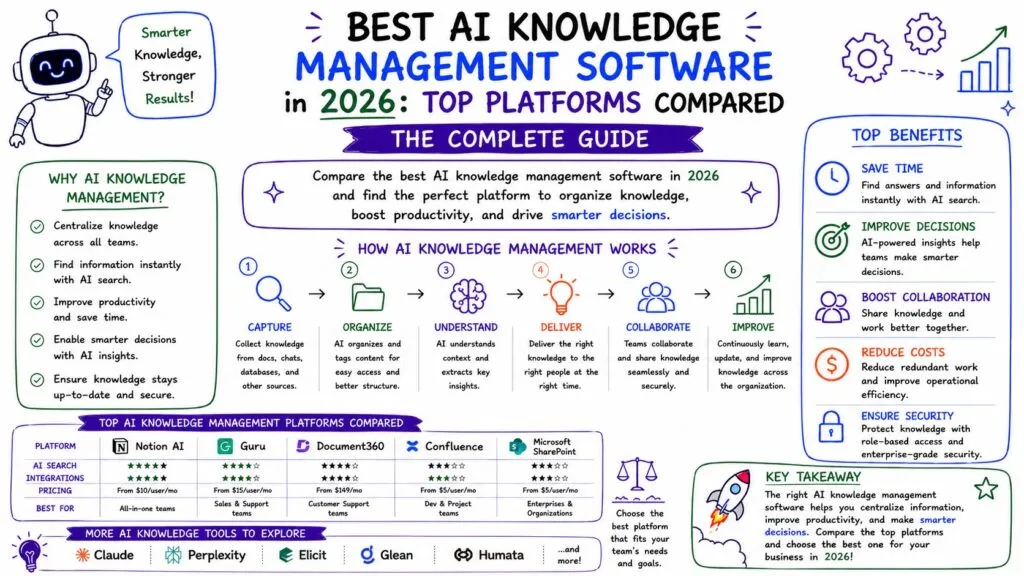
1. Notion AI — Best Overall for Growing Businesses
Best for: Startups, agencies, SMBs, and cross-functional teams.
Notion combines documentation, internal wikis, projects, databases, meeting information, and AI inside a flexible workspace.
This makes it particularly attractive for businesses that don’t want knowledge management isolated from everyday work.
Teams can use Notion to build:
- Company wikis
- SOP libraries
- Employee handbooks
- Project documentation
- Meeting knowledge
- Process documentation
- Department portals
Its AI capabilities can then help employees search, summarize, create, and work with that information.
Pros
- Excellent all-in-one environment
- Flexible knowledge organization
- Easy to build internal wikis and SOP libraries
- Suitable for multiple departments
Cons
- Large workspaces require good governance
- Less specialized than dedicated enterprise-search platforms
Verdict: Our strongest overall choice for growing businesses wanting documentation and knowledge management inside one flexible workspace.
2. Guru — Best for Enterprise Knowledge Management
Best for: Organizations with knowledge distributed across multiple applications.
Guru focuses heavily on making trusted organizational knowledge available where employees work.
Rather than forcing every piece of information into a new wiki, businesses can connect knowledge from existing systems and provide employees with AI-powered ways to retrieve it.
Key Strengths
- Enterprise knowledge search
- AI-generated answers
- Knowledge verification
- Connected business applications
- Permission-aware knowledge
- Governance features
Pros
- Excellent for fragmented knowledge
- Strong emphasis on trustworthy information
- Useful across support, sales, HR, and operations
Cons
- May be excessive for very small teams
- Greatest value comes from broader organizational adoption
Verdict: One of the strongest options for established businesses where knowledge already exists across numerous tools.
3. Glean — Best for Enterprise AI Search
Best for: Large organizations that need unified search across business systems.
Glean approaches knowledge management from the enterprise-search side.
Its search product connects information across more than 100 tools while keeping results permissions-aware. It also uses company and user context to improve relevance.
This makes Glean particularly valuable when the biggest problem isn’t creating more documentation—it’s finding information that already exists.
Pros
- Powerful cross-application search
- Permission-aware results
- Contextual answers
- Built for enterprise environments
Cons
- More enterprise-focused than small-business oriented
- May be unnecessary if most knowledge already lives in one platform
Verdict: A compelling option for enterprises struggling with knowledge fragmentation across large technology stacks.
4. Confluence + Rovo — Best for Product and Technical Teams
Best for: Engineering, IT, product, and software organizations.
Confluence remains a major knowledge management platform, particularly for companies already using Jira.
Atlassian’s Rovo capabilities make it more AI-centric. Teams can use Rovo to generate Confluence content from prompts and contextual material, then review and refine the resulting drafts.
Key Strengths
- Technical documentation
- Product knowledge
- AI-assisted content creation
- Jira integration
- Collaborative knowledge spaces
- Enterprise search
Pros
- Excellent for technical documentation
- Deep Atlassian integration
- Mature knowledge-management ecosystem
Cons
- Can become complicated as spaces grow
- Smaller non-technical teams may find simpler platforms easier
Verdict: The logical choice for organizations already running product and engineering workflows through Atlassian.
5. Document360 — Best AI Knowledge Base Platform
Best for: SaaS companies, customer support teams, technical writers, and documentation-heavy businesses.
Document360 is more specialized than general workspaces such as Notion.
Its Eddy AI system covers content creation, knowledge discovery, governance, and automation. The platform can generate documentation from prompts, video, audio, and transcripts, while Ask Eddy provides contextual answers based on knowledge-base content.
Key Strengths
- AI knowledge bases
- AI documentation creation
- Intelligent search
- Knowledge-base governance
- Content workflows
- Customer self-service
Pros
- Purpose-built for documentation
- Strong AI authoring capabilities
- Suitable for internal and external knowledge
- Powerful for customer-facing documentation
Cons
- More specialized than an all-in-one workspace
- Requires other tools for broader project management
Verdict: Our top choice when structured documentation and knowledge bases are the primary requirement.
6. Slite — Best for Keeping Internal Knowledge Current
Best for: Remote companies and teams struggling with outdated documentation.
Creating a company wiki is relatively easy. Maintaining it six months later is much harder.
Slite emphasizes internal knowledge management and keeping company information useful rather than simply accumulating documents.
Pros
- Clean internal knowledge experience
- AI-powered knowledge discovery
- Good fit for distributed teams
- Strong documentation focus
Cons
- Less comprehensive than broader work-management platforms
- Organizations may need additional project software
Verdict: A strong option when documentation exists but employees no longer trust whether it’s current.
7. Tettra — Best Simple Internal Wiki
Best for: Small and growing businesses.
Not every company needs an enterprise knowledge architecture.
Tettra provides a simpler approach to internal knowledge management, helping teams centralize company processes, policies, answers, and documentation.
Pros
- Straightforward implementation
- Suitable for smaller teams
- Focused internal knowledge experience
- Easier adoption than complex enterprise systems
Cons
- Fewer enterprise capabilities
- Growing organizations may eventually need broader search and governance
Verdict: A practical choice for small businesses building their first organized internal knowledge base.
8. SharePoint + Copilot — Best for Microsoft 365 Businesses
Best for: Businesses heavily invested in Microsoft 365.
SharePoint already stores enormous amounts of organizational knowledge. Microsoft’s AI strategy increasingly makes that information accessible through Copilot and agents.
Copilot in SharePoint can answer questions about content, summarize and compare files, generate FAQs, organize libraries, and help maintain SharePoint content. Microsoft also provides SharePoint agents that answer questions using content users have permission to access. Some Copilot-in-SharePoint capabilities remain in preview as of July 2026.
Pros
- Excellent Microsoft 365 integration
- Strong permission model
- Existing enterprise content can remain in SharePoint
- AI agents can use organizational knowledge
Cons
- More administration than lightweight knowledge tools
- Best experience depends on Microsoft’s broader ecosystem and licensing
Verdict: One of the strongest choices for companies already standardized on Microsoft 365.
Which AI Knowledge Management Tool Is Best?
There isn’t one winner for every organization.
For most growing businesses, start with Notion AI because it combines documentation, collaboration, databases, and AI without requiring a complex enterprise implementation.
Choose Guru when knowledge is scattered across multiple departments and applications.
Choose Glean when enterprise-wide search is the primary challenge.
Choose Confluence + Rovo if engineering and product documentation are central to your knowledge strategy.
Choose Document360 for structured internal or customer-facing documentation.
Choose Slite when maintaining accurate internal knowledge is a priority, Tettra for simpler small-business requirements, and SharePoint + Copilot if your organization already operates heavily within Microsoft 365.
AI Knowledge Base vs Traditional Knowledge Management
| Traditional Knowledge Base | AI Knowledge Base |
|---|---|
| Keyword search | Natural-language questions |
| Employees locate documents | AI can produce direct answers |
| Information stored in folders | Knowledge can span connected systems |
| Manual summaries | AI-generated summaries |
| Static wiki | AI-assisted knowledge maintenance |
| Users navigate information | Information comes to users |
AI doesn’t eliminate the need for organized documentation. In fact, inaccurate source material can produce inaccurate answers.
The strongest approach combines good documentation + governance + AI retrieval.
That’s why businesses should connect knowledge management with AI process documentation and SOP creation rather than treating AI search as a substitute for maintaining company knowledge.
How Businesses Use AI Knowledge Management
Employee Onboarding
New employees can retrieve policies, responsibilities, training information, SOPs, and software instructions without asking managers the same questions repeatedly.
For process-specific onboarding, see our AI SOP Generator: Create Standard Operating Procedures Faster guide.
Customer Support
Support agents can search product documentation, policies, troubleshooting instructions, and previous knowledge while handling customer conversations.
This creates a useful connection with your broader AI Customer Success Workflow and AI Workflow for Customer Support.
Sales Enablement
Sales representatives can quickly retrieve:
- Product information
- Pricing policies
- Competitor comparisons
- Objection-handling guidance
- Proposal resources
- Case studies
Businesses automating the broader revenue process can combine this knowledge layer with an AI Sales Workflow.
Operations
Operations teams can centralize SOPs, approval procedures, checklists, policies, and process documentation.
Knowledge management therefore becomes an important foundation for AI Business Process Automation: automation works better when the underlying processes and organizational rules are clearly documented.
How to Choose a Knowledge Management Platform
1. Determine Where Your Knowledge Already Lives
Don’t migrate thousands of documents without a reason.
If your knowledge already lives across many systems, prioritize strong connectors and enterprise search. If you’re building a knowledge base from scratch, a centralized platform may be simpler.
2. Test AI Search With Real Questions
Create 20–30 questions employees commonly ask and evaluate whether each platform retrieves the correct information.
3. Evaluate Source Transparency
For business-critical knowledge, users should be able to determine where an AI-generated answer came from.
4. Check Permissions and Governance
Review:
- User permissions
- Connected-source permissions
- Administrative controls
- Version history
- Knowledge ownership
- Verification processes
- Security requirements
5. Consider Automation and AI Agents
Knowledge management is increasingly becoming the context layer behind AI agents.
An AI system that knows your approved policies, processes, product information, and SOPs can potentially perform far more useful work than a generic assistant.
Our What Are AI Agents? A Business Owner’s Guide explains this connection in greater detail.
Frequently Asked Questions
What is the best AI knowledge management software?
Notion AI is a strong overall option for growing businesses. Guru and Glean are compelling enterprise choices, Confluence is excellent for technical teams, Document360 specializes in documentation, and SharePoint is well suited to Microsoft-centric organizations.
What is an AI knowledge base?
An AI knowledge base combines organizational information with artificial intelligence so employees or customers can ask natural-language questions and receive relevant answers based on available knowledge.
Can AI replace an internal wiki?
Usually, AI enhances rather than replaces an internal wiki. Businesses still need reliable source information, while AI makes that information easier to create, search, summarize, and retrieve.
Is AI knowledge management useful for small businesses?
Yes. Small businesses can use knowledge management software to centralize SOPs, onboarding information, company policies, customer-support documentation, and recurring processes.
What’s the difference between AI documentation and knowledge management?
AI documentation focuses primarily on creating and maintaining information. Knowledge management covers the broader lifecycle of capturing, organizing, governing, finding, sharing, and using organizational knowledge.
Final Verdict
The best AI knowledge management software depends on where your business knowledge lives and how employees need to use it.
Notion AI offers one of the strongest all-around combinations for growing businesses. Guru and Glean are better suited to organizations that need enterprise-wide knowledge discovery, while Confluence + Rovo is particularly compelling for product and engineering teams.
Document360 is our preferred specialist for structured documentation and knowledge bases. Slite focuses on maintaining useful internal knowledge, Tettra offers simplicity for smaller teams, and SharePoint + Copilot deserves serious consideration for Microsoft 365 organizations.
The bigger opportunity is not simply creating another company wiki.
Businesses should build a reliable knowledge layer containing their processes, policies, SOPs, product information, and institutional expertise—and then connect that knowledge to AI search, workflow automation, and eventually AI agents.
Done correctly, your knowledge management platform becomes the organizational memory behind your AI-powered business.