
Time to Read:
Table of Contents
Introduction
Running a small business means wearing multiple hats. Business owners often manage sales, marketing, customer service, finance, operations, and administration simultaneously. As a business grows, repetitive manual tasks consume more time, reducing the team’s ability to focus on strategic growth.
This is where workflow automation for small business becomes a competitive advantage.
Workflow automation enables businesses to automate repetitive processes, connect software applications, eliminate manual data entry, and ensure tasks move through the organization efficiently. Combined with artificial intelligence (AI), workflow automation can also make intelligent decisions, personalize customer interactions, and provide real-time business insights.
Whether you own a startup, ecommerce store, consulting firm, agency, or local business, implementing workflow automation can improve productivity while reducing operational costs.
This guide explains how workflow automation works, highlights practical automation examples, recommends software solutions, and provides a step-by-step framework for building scalable business workflows.
If you’re expanding your automation strategy, this guide complements:
- Best AI Workflows for Small Businesses (Step-by-Step Guide)
- AI Marketing Workflow: The Complete Guide for Business Growth
- AI Sales Workflow: The Complete Guide for Modern Businesses
- How Small Businesses Can Save 20 Hours Per Week Using AI
- Best AI Workflow Builders for Businesses
What Is Workflow Automation?
Workflow automation is the process of using software to automatically complete repetitive business tasks based on predefined rules and triggers.
Instead of manually moving information between applications or assigning repetitive work to employees, automated workflows execute these actions consistently and accurately.
For example:
- A website inquiry automatically creates a CRM contact.
- An invoice is generated after a purchase.
- New customers receive onboarding emails.
- Sales managers receive notifications when high-value leads are identified.
- Reports are generated automatically every Monday morning.
AI takes this a step further by analyzing data, making recommendations, and triggering actions based on customer behavior or business conditions.
Why Small Businesses Need Workflow Automation
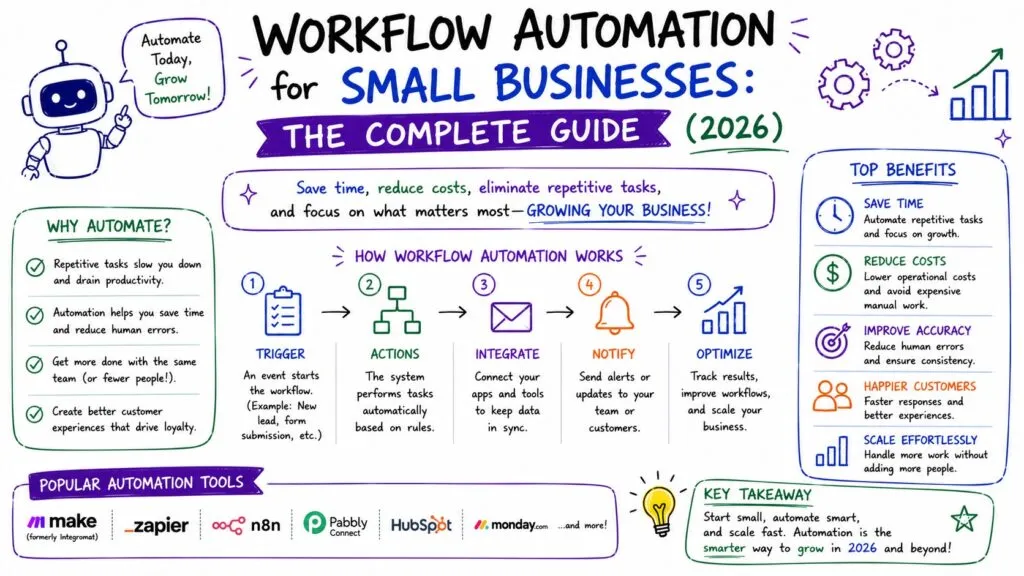
Small businesses often operate with limited budgets and lean teams. Automation helps them accomplish more without increasing headcount.
Save Time
Automate repetitive tasks such as email follow-ups, appointment scheduling, invoice generation, and CRM updates.
Reduce Human Error
Automation ensures tasks follow consistent processes, reducing mistakes caused by manual data entry.
Improve Customer Experience
Respond to inquiries faster and deliver timely updates throughout the customer journey.
Scale Operations
As your business grows, automated workflows handle increasing workloads without requiring proportional staffing increases.
Increase Team Productivity
Employees spend less time on administrative work and more time on activities that drive revenue and customer satisfaction.
Common Business Processes to Automate
Lead Management
Automate lead capture, qualification, CRM updates, and follow-up sequences.
Marketing
Schedule campaigns, publish social media content, and trigger personalized email marketing based on customer actions.
Sales
Assign leads, schedule meetings, generate proposals, and update CRM records automatically.
Customer Success
Automate onboarding, health monitoring, renewal reminders, and customer feedback collection.
Finance
Generate invoices, send payment reminders, reconcile transactions, and produce financial reports.
Human Resources
Streamline recruitment, employee onboarding, leave approvals, and training assignments.
Example Workflow Automation for Small Businesses
1. Lead Generation Workflow
Website Visitor
↓
Contact Form Submitted
↓
CRM Record Created
↓
Lead Score Assigned
↓
Sales Notification
↓
Follow-Up Email Sequence
↓
Meeting Scheduled
For a detailed implementation, see How to Build an AI Lead Generation Workflow.
2. Marketing Workflow
Campaign Planning
↓
Keyword Research
↓
Content Creation
↓
SEO Optimization
↓
Publishing
↓
Social Media Promotion
↓
Analytics Dashboard
Learn more in AI Marketing Workflow: The Complete Guide for Business Growth.
3. Customer Success Workflow
Customer Purchase
↓
Welcome Email
↓
Onboarding Checklist
↓
Usage Monitoring
↓
Customer Health Score
↓
Renewal Reminder
↓
Upsell Opportunity
4. Finance Workflow
Purchase Completed
↓
Invoice Generated
↓
Accounting Software Updated
↓
Payment Reminder
↓
Monthly Financial Report
Best Workflow Automation Software for Small Businesses
| Platform | Best For | Key Features |
|---|---|---|
| Make | Visual workflow automation | Multi-step automations, AI integrations |
| Zapier | App integrations | Connects thousands of business apps |
| Microsoft Power Automate | Microsoft ecosystem | Document workflows, approvals |
| HubSpot | CRM & marketing automation | Sales, service, and marketing workflows |
| Monday.com | Project management | Workflow templates and team collaboration |
| ClickUp | Business operations | Task automation and project tracking |
| Airtable | Data management | Automation with customizable databases |
| n8n | Technical users | Open-source workflow automation |
Each platform offers different strengths depending on your business size, technical expertise, and automation goals.
How to Build an AI Workflow Automation Strategy
Step 1: Identify Repetitive Tasks
List daily activities that consume significant time, such as data entry, email follow-ups, or report generation.
Step 2: Map Existing Processes
Document how information moves between people and systems. This helps identify bottlenecks and unnecessary manual steps.
Step 3: Choose the Right Automation Platform
Select software that integrates with your existing CRM, accounting system, marketing tools, and communication platforms.
Step 4: Start Small
Begin with one workflow—such as lead management or customer onboarding—and expand once you see measurable results.
Step 5: Measure Performance
Track key metrics such as time saved, response times, error reduction, and customer satisfaction to evaluate the impact of automation.
Best Practices
Standardize Processes First
Automation works best when underlying business processes are clearly defined and documented.
Keep Humans Involved
Use automation to support employees, not replace critical decision-making or customer relationships.
Integrate Your Systems
Connect your CRM, email platform, accounting software, and project management tools to avoid data silos.
Review Workflows Regularly
As your business evolves, update automation rules to reflect new products, services, or customer needs.
Common Mistakes to Avoid
Automating Broken Processes
If a process is inefficient manually, automation will simply execute it faster. Optimize the workflow before automating it.
Overcomplicating Workflows
Avoid creating unnecessary branches and conditions. Simple workflows are easier to maintain and troubleshoot.
Ignoring Data Quality
Automation depends on accurate data. Regularly clean and validate customer, sales, and financial records.
Failing to Monitor Results
Review automation performance regularly to identify failures, bottlenecks, and opportunities for improvement.
Frequently Asked Questions
What is workflow automation for small businesses?
Workflow automation uses software to automate repetitive business tasks, improve efficiency, and reduce manual effort across departments such as sales, marketing, finance, and customer support.
How does AI improve workflow automation?
AI enhances workflow automation by analyzing data, predicting outcomes, personalizing customer interactions, and making intelligent recommendations rather than simply following fixed rules.
Which workflow automation software is best for small businesses?
Popular choices include Make, Zapier, HubSpot, Microsoft Power Automate, Monday.com, ClickUp, Airtable, and n8n. The best option depends on your existing tools and business requirements.
Is workflow automation expensive?
Many platforms offer free or entry-level plans suitable for startups and small businesses. The time savings and productivity improvements often outweigh the subscription costs.
What processes should I automate first?
Most businesses benefit from automating lead management, customer onboarding, email marketing, invoice generation, and recurring reporting before expanding to more advanced workflows.
Final Verdict
Workflow automation is no longer reserved for large enterprises. Small businesses can use automation and AI to streamline daily operations, reduce administrative work, and create scalable processes that support long-term growth.
Start by automating one high-impact process, such as lead management or customer onboarding, and gradually expand into marketing, sales, finance, and customer success workflows. By integrating automation platforms with your existing business systems, you can save time, improve accuracy, and deliver a better experience for both employees and customers.
When combined with AI-powered insights and modern workflow software, automation becomes a foundation for sustainable business growth rather than just a productivity tool.