
Time to Read:
Table of Contents
Introduction
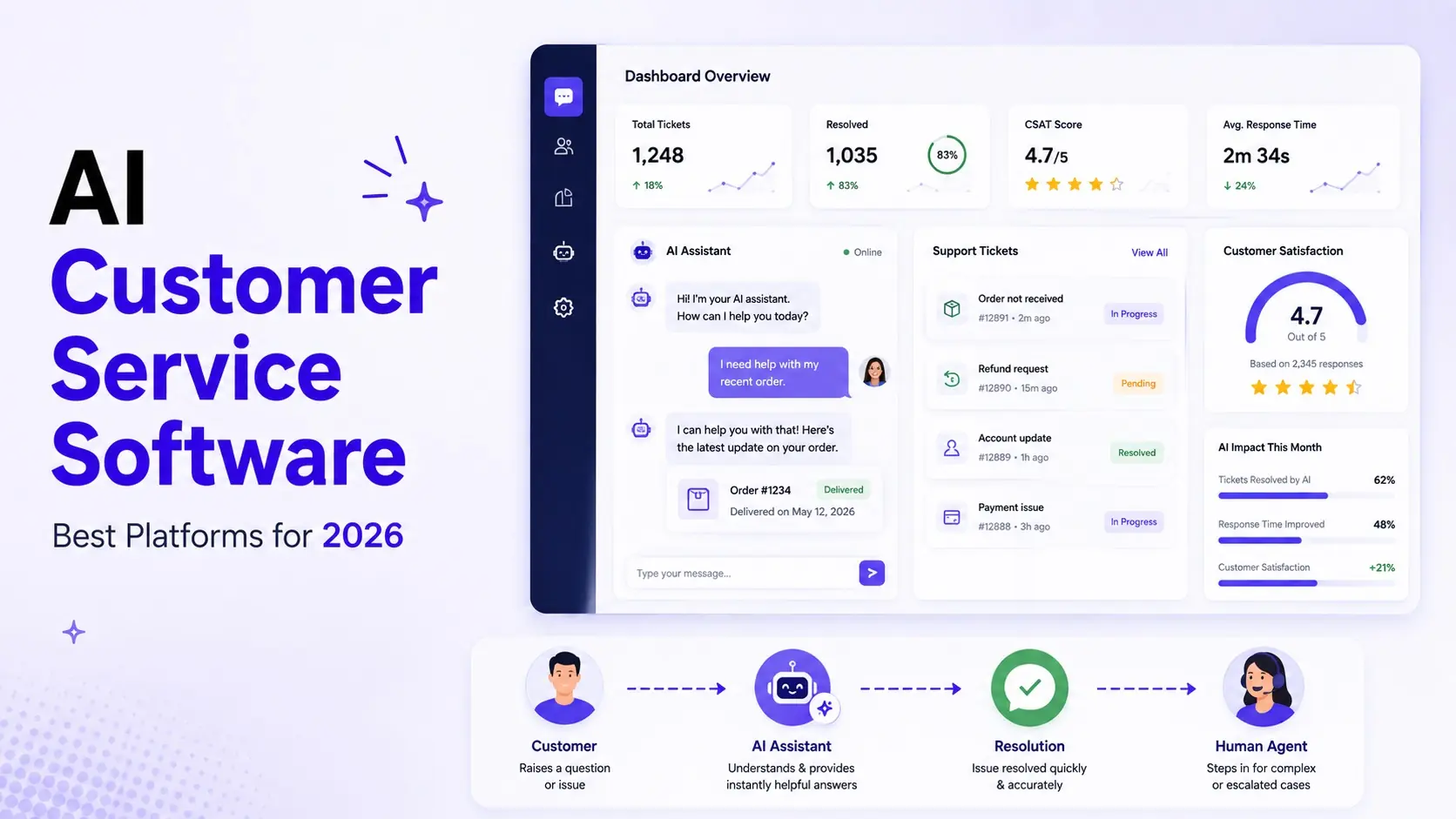
Customer service teams are under pressure to respond faster while handling more conversations across chat, email, social media, and self-service channels.
That’s why AI customer service software has moved beyond simple chatbots.
Modern platforms can classify support requests, search knowledge bases, summarize conversations, recommend responses, automate tickets, detect customer sentiment, and—increasingly—resolve complete customer requests through AI agents.
But choosing the right platform isn’t as simple as finding the tool with the most AI features.
A small business with 500 support conversations per month has very different requirements from an enterprise processing hundreds of thousands of interactions.
This guide compares the best AI customer service software for different business needs and explains what to look for before choosing a platform.
Quick Answer: Which AI Customer Service Software Is Best?
If you want a quick starting point:
| Software | Best For | Standout Capability |
|---|---|---|
| Zendesk | Growing and enterprise support teams | AI agents + service platform |
| Freshdesk | Small and mid-sized businesses | Accessible AI-powered support |
| Intercom | Conversational support | AI-first customer conversations |
| HubSpot Service Hub | CRM-centered businesses | CRM + customer service |
| Help Scout | Customer-focused support teams | Simple support experience |
| Gorgias | Ecommerce | Ecommerce support automation |
| Forethought | AI-first support automation | AI resolution and agent assistance |
| Zoho Desk | Budget-conscious businesses | Value + help desk automation |
Best overall for complex support operations: Zendesk
Best for small businesses: Freshdesk
Best for conversational AI: Intercom
Best for CRM integration: HubSpot Service Hub
Best for ecommerce: Gorgias
What Is AI Customer Service Software?
AI customer service software is software that uses artificial intelligence to automate or assist customer support activities.
Depending on the platform, this can include:
- AI chatbots
- AI agents
- Automated ticket classification
- Intelligent routing
- AI-generated responses
- Conversation summaries
- Sentiment analysis
- Knowledge-base search
- Customer self-service
- Agent copilots
- Automated workflows
- Customer intent detection
- Reporting and analytics
The important distinction is that modern AI customer service software isn’t necessarily designed to replace human agents.
Instead, it can divide customer-service work into three layers:
AI handles repetitive requests
↓
AI assists agents with complex requests
↓
Humans handle high-value or sensitive interactions
That model usually produces a better customer experience than attempting to automate everything.
Freshworks, for example, describes AI customer service as covering chatbots, virtual agents, agent assistance, intent detection, knowledge-base answers, and customer insights.
AI Customer Service Software vs AI Help Desk Software
These terms overlap, but they’re not identical.
AI Help Desk Software
Usually focuses on:
- Tickets
- Ticket routing
- Internal support workflows
- Agent productivity
- SLAs
- Knowledge bases
- Ticket reporting
AI Customer Service Software
Usually has a broader scope:
- AI agents
- Chat
- Self-service
- Ticketing
- Knowledge bases
- Customer conversations
- Agent assistance
- Automation
- CRM integrations
This article takes the broader view of customer service software and the AI layer surrounding it.
The 5 Capabilities That Matter Most
Don’t judge AI customer service software simply by how many AI features appear on the pricing page.
Evaluate these five capabilities first.
1. AI Resolution
Can the software actually resolve customer requests?
A basic chatbot might answer:
“What are your business hours?”
An AI agent may be able to handle:
“I need to change the shipping address for my order.”
The second requires access to information, reasoning, and potentially an action inside another system.
Zendesk’s current AI platform, for example, positions AI agents around multi-step resolution and connecting to business systems rather than simply generating text.
2. Knowledge Grounding
AI support is only as useful as the information it can access.
Your software should ideally be able to use:
- Help-center articles
- Product documentation
- FAQs
- Policies
- Internal procedures
- CRM information
- Approved external sources
This reduces the risk of AI producing answers that sound convincing but don’t reflect your actual policies.
3. Agent Assistance
Even when AI cannot resolve a request, it should help the human agent.
Useful capabilities include:
- Response drafting
- Conversation summaries
- Suggested next actions
- Intent classification
- Sentiment detection
- Knowledge recommendations
- Translation
Zendesk’s Copilot, for example, is designed to provide contextual recommendations, suggested next steps, drafting, and approved actions inside the agent workspace.
4. Automation
Look for workflows that can automatically:
- Categorize requests
- Assign tickets
- Set priority
- Trigger follow-ups
- Escalate conversations
- Update CRM records
- Send satisfaction surveys
- Create internal tasks
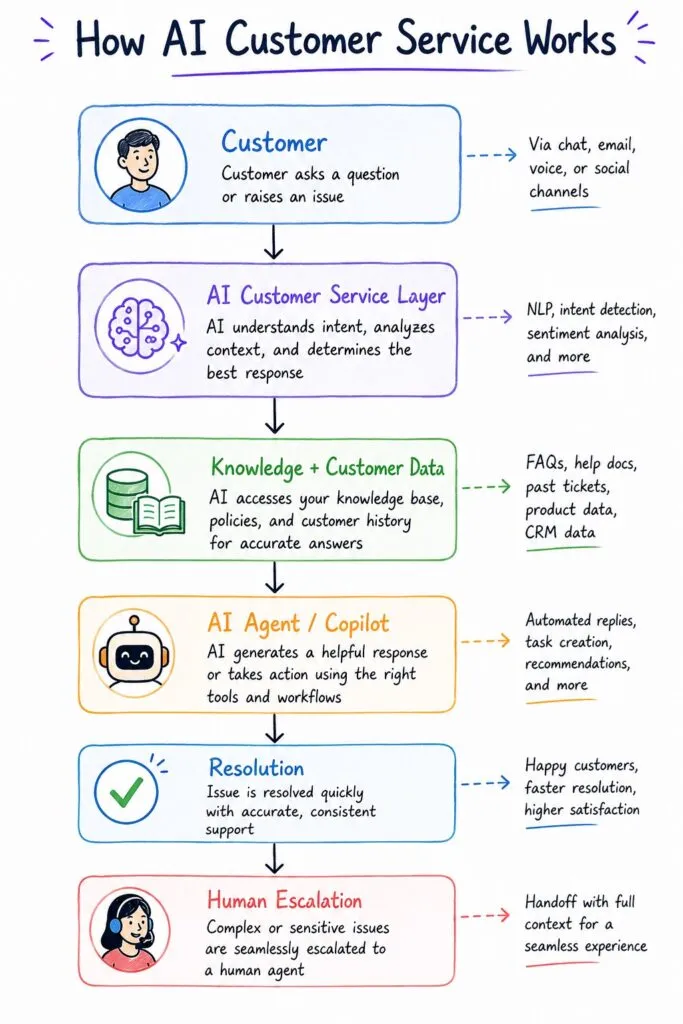
5. Human Escalation
This is one of the most overlooked features.
A good AI system needs to know when not to continue.
For example:
Customer Request
       ↓
AI Understands Intent
       ↓
Can AI Resolve It?
   ↙           ↘
 YES           NO
  ↓             ↓
Resolve       Human Agent
                ↓
             Resolution
For sensitive complaints, refunds, account cancellations, legal issues, or highly complex problems, human escalation should be part of the design.
8 Best AI Customer Service Software in 2026
1. Zendesk
Best for: Growing and enterprise customer service teams
AI capability: ⭐⭐⭐⭐⭐
Best use case: Complex customer service operations requiring AI agents, ticketing, knowledge, analytics, and omnichannel support.
Zendesk is one of the strongest choices when customer service is a major operational function rather than simply a shared inbox.
Its current AI offering includes AI agents, knowledge capabilities, agent assistance, quality assurance, and automated resolution workflows.
Pros
- Strong AI agent capabilities
- Mature ticketing platform
- Extensive integrations
- Omnichannel support
- Advanced reporting
- Strong enterprise capabilities
Cons
- Can become expensive as requirements grow
- More complex than lightweight support tools
- Advanced capabilities may require higher-tier plans
Best for
Businesses with complex support operations and companies expecting their support infrastructure to scale.
2. Freshdesk
Best for: Small and mid-sized businesses
AI capability: ⭐⭐⭐⭐☆
Best use case: Businesses that want AI support capabilities without starting with a highly complex enterprise platform.
Freshdesk’s AI capabilities include customer-facing automation, agent assistance, knowledge-based answers, and support analytics. Freshworks also emphasizes integrations with CRM, ticketing, and other support workflows.
Pros
- Accessible for smaller teams
- Strong help desk foundation
- AI capabilities built into the support experience
- Good automation options
- Broad integrations
Cons
- Advanced functionality can increase complexity
- Larger teams may eventually need more sophisticated enterprise features
Best for
Small businesses and growing support teams that want to introduce AI without rebuilding their entire service operation.
Explore Freshworks AI Customer Service
3. Intercom
Best for: Conversational customer support
AI capability: ⭐⭐⭐⭐⭐
Best use case: SaaS and digital businesses that rely heavily on chat and proactive customer communication.
Intercom is particularly attractive when customer service, onboarding, messaging, and product engagement overlap.
Its Fin AI platform is designed around AI-powered customer conversations, while Intercom’s broader platform combines messaging, support workflows, and customer context.
Pros
- Strong conversational experience
- AI-first approach
- Excellent for SaaS
- Customer messaging and support in one environment
- Strong onboarding potential
Cons
- Can be less suitable for traditional ticket-heavy environments
- Pricing can increase with usage and requirements
Best for
SaaS businesses and digital products where customer communication happens heavily through chat and messaging.
4. HubSpot Service Hub
Best for: Businesses already using HubSpot CRM
AI capability: ⭐⭐⭐⭐☆
Best use case: Companies wanting customer service connected directly to sales and customer data.
The major advantage of HubSpot is context.
Instead of keeping support information isolated, businesses can connect customer service activity with their broader CRM.
That can be particularly useful when a customer conversation needs to move between:
Marketing → Sales → Support → Customer Success
Pros
- Strong CRM integration
- Unified customer records
- Service workflows
- Marketing and sales connectivity
- Useful for growing businesses
Cons
- Best value comes when you’re already invested in the HubSpot ecosystem
- Advanced functionality can require paid tiers
Best for
SMBs and growing companies that want customer service connected to their CRM.
5. Help Scout
Best for: Small support teams focused on personalized service
AI capability: ⭐⭐⭐⭐☆
Help Scout takes a simpler approach than enterprise platforms.
It is particularly useful for teams that want a customer-focused support inbox combined with AI assistance without adopting a large enterprise service platform.
Pros
- Simple interface
- Customer-focused
- Shared inbox capabilities
- Knowledge base functionality
- Useful AI assistance
Cons
- Less suited to highly complex enterprise workflows
- Not as broad as full enterprise service platforms
Best for
Small and mid-sized teams that prioritize simplicity and personalized customer support.
6. Gorgias
Best for: Ecommerce businesses
AI capability: ⭐⭐⭐⭐☆
Gorgias is particularly interesting for ecommerce because customer service frequently involves questions about:
- Orders
- Shipping
- Returns
- Refunds
- Product information
- Order status
That makes ecommerce an excellent environment for AI automation because many requests follow structured workflows.
Pros
- Ecommerce-focused
- Strong Shopify ecosystem
- Customer/order context
- Automated responses
- Useful for repetitive ecommerce support
Cons
- Less suitable for businesses outside ecommerce
- Specialized rather than general-purpose
Best for
Shopify and ecommerce businesses with high volumes of repetitive customer questions.
7. Forethought
Best for: AI-first customer support automation
AI capability: ⭐⭐⭐⭐⭐
Forethought takes an AI-first approach to customer support, focusing heavily on automation and AI assistance.
It’s worth considering when your primary goal is to increase automated resolution rather than simply add AI drafting to an existing help desk.
Pros
- Strong AI focus
- Automated support resolution
- Agent assistance
- Designed around support automation
Cons
- May be more than a small business needs
- Requires careful evaluation of integrations and implementation
Best for
Support teams that specifically want to increase AI-powered resolution and automation.
8. Zoho Desk
Best for: Budget-conscious businesses
Zoho Desk combines traditional help desk capabilities with AI assistance and workflow automation.
It’s particularly attractive for businesses already using the broader Zoho ecosystem.
Pros
- Competitive value
- Help desk functionality
- AI assistance
- Workflow automation
- Broader Zoho integration
Cons
- Interface and configuration may require a learning curve
- AI capabilities may not match the depth of dedicated AI-first platforms
Best for
Small businesses looking for customer service automation while keeping software costs under control.
AI Customer Service Software Comparison
| Platform | Best For | AI Agents | Help Desk | CRM | Best Strength |
|---|---|---|---|---|---|
| Zendesk | Enterprise | ✅ | ✅ | ✅ | Complete service platform |
| Freshdesk | SMBs | ✅ | ✅ | ✅ | Accessible AI support |
| Intercom | SaaS | ✅ | ✅ | ✅ | Conversational support |
| HubSpot | CRM users | ✅ | ✅ | ✅ | Unified customer data |
| Help Scout | Small teams | ◐ | ✅ | ◐ | Simplicity |
| Gorgias | Ecommerce | ✅ | ✅ | ◐ | Ecommerce automation |
| Forethought | AI-first teams | ✅ | ◐ | ✅ | AI resolution |
| Zoho Desk | Budget teams | ◐ | ✅ | ✅ | Value |
Legend: ✅ Strong capability · ◐ Available/secondary capability
Which AI Customer Service Software Should You Choose?
Instead of asking:
“What is the best AI customer service software?”
Ask:
“What is the biggest customer-service problem I need the software to solve?”
If You Need Maximum Automation
Choose: Zendesk or Forethought
Look for:
- AI agents
- Automated resolution
- Workflow execution
- Knowledge integration
- Human escalation
If You’re a Small Business
Choose: Freshdesk, Help Scout, or Zoho Desk
Prioritize:
- Easy implementation
- Affordable scaling
- Knowledge base
- AI assistance
- Basic automation
If You’re a SaaS Business
Choose: Intercom or HubSpot
Prioritize:
- Messaging
- Product context
- Customer lifecycle
- CRM integration
- Proactive engagement
If You’re Ecommerce
Choose: Gorgias
Prioritize:
- Order data
- Returns
- Shipping
- Ecommerce integrations
- Automated resolution
If You’re Enterprise
Choose: Zendesk or another enterprise-grade platform based on your existing stack.
Prioritize:
- Governance
- Security
- Integrations
- Analytics
- AI agent controls
- Scalability
Best For
Best overall: Zendesk
Best for small businesses: Freshdesk
Best for conversational support: Intercom
Best for CRM-centered businesses: HubSpot Service Hub
Best for ecommerce: Gorgias
Best for AI-first automation: Forethought
Best for budget-conscious teams: Zoho Desk
The AI Customer Service Workflow You Should Build
Buying software isn’t enough.
The real value comes from connecting the software to a workflow.
Here’s a practical starting architecture:
Customer Question
       ↓
AI Understands Intent
       ↓
Search Trusted Knowledge
       ↓
Can AI Resolve?
   ↙           ↘
 YES           NO
  ↓             ↓
AI Resolution   Create Ticket
  ↓             ↓
Update CRM    AI Classifies
  ↓             ↓
Survey        Route to Agent
                ↓
             AI Copilot
                ↓
             Human Resolution
                ↓
             Update Knowledge
                ↓
             Analyze Outcome
This creates a feedback loop.
Every unresolved conversation becomes an opportunity to improve the knowledge base or automation.
That is much more powerful than simply installing a chatbot.
Read our AI Help Desk Software guide.
How to Implement AI Customer Service Software
Step 1: Identify Repetitive Requests
Review your last 500–1,000 support conversations.
Categorize them.
For example:
| Request Type | % of Tickets | Automation Potential |
|---|---|---|
| Order status | 18% | Very High |
| Password/account help | 14% | Very High |
| Product questions | 20% | High |
| Billing | 12% | Medium |
| Complaints | 8% | Low |
| Complex technical issues | 18% | Low |
| Other | 10% | Medium |
This gives you a much better starting point than simply buying the most expensive AI platform.
Step 2: Build or Clean Your Knowledge Base
AI customer service works best when the underlying information is accurate.
Create clear documentation for:
- FAQs
- Policies
- Product information
- Troubleshooting
- Shipping
- Returns
- Billing
- Account procedures
Step 3: Start With Low-Risk Automation
Automate predictable requests first.
Examples:
- Order status
- Business hours
- Password instructions
- Shipping information
- Basic product questions
Don’t begin with sensitive or complex cases.
Step 4: Add Agent Copilot Features
Once basic automation works, introduce:
- AI summaries
- Suggested replies
- Knowledge recommendations
- Sentiment detection
- Conversation classification
This helps your human team become more productive without giving AI complete autonomy.
Step 5: Add AI Agents
Only after your knowledge and workflows are reliable should you expand into autonomous resolution.
Start with clearly defined tasks.
Then monitor:
- Resolution rate
- Escalation rate
- Customer satisfaction
- Incorrect answers
- Reopened tickets
Step 6: Create a Human Escalation Policy
Define exactly when AI should hand over.
For example:
Immediate escalation
- Angry customer
- Legal threat
- Account cancellation
- Sensitive billing issue
- Security concern
- Repeated failed AI resolution
This protects customer experience while allowing automation to handle routine work.
How to Measure ROI
Don’t measure AI success by the number of AI conversations.
Measure business outcomes.
Support Metrics
- First response time
- Average resolution time
- Resolution rate
- Ticket volume
- Escalation rate
- First-contact resolution
Customer Metrics
- CSAT
- Customer effort
- Repeat contacts
- Complaint rate
Business Metrics
- Cost per resolution
- Agent productivity
- Support cost per customer
- Revenue retained
- Hours saved
A simple model is:
AI savings = automated conversations × average cost per human resolution
Then subtract:
Software + implementation + monitoring costs
The resulting figure gives you a starting estimate for automation ROI.
Common Mistakes to Avoid
Choosing Software Before Defining the Problem
Start with your support data.
Automating Too Much Too Quickly
Begin with low-risk repetitive questions.
Using an Unreliable Knowledge Base
Incorrect documentation produces incorrect AI answers.
Ignoring Escalation
AI should always have a clear path to a human.
Focusing Only on Cost Savings
Better customer experiences and faster resolutions can be just as valuable as reducing support costs.
Forgetting Customer Success
Support interactions contain valuable information about customer health.
A repeated product problem can become a churn signal.
Read our Best AI Tools for Customer Success Teams guide that covers the next layer of this customer lifecycle.
Frequently Asked Questions
What is AI customer service software?
AI customer service software uses artificial intelligence to automate or assist customer support activities such as answering questions, routing tickets, generating responses, summarizing conversations, and resolving routine requests.
What is the best AI customer service software?
There isn’t one universal winner. Zendesk is a strong overall choice for complex and enterprise support, Freshdesk is attractive for small businesses, Intercom is strong for conversational support, HubSpot is useful for CRM-centered teams, and Gorgias is particularly suited to ecommerce.
Is AI customer service software the same as a chatbot?
No. A chatbot is one component of an AI customer service system. Modern platforms can also include AI agents, ticket automation, knowledge retrieval, agent copilots, sentiment analysis, reporting, and CRM integrations.
Can AI customer service software replace human agents?
AI can automate many repetitive interactions, but human agents remain important for complex, sensitive, and high-value customer conversations. The strongest systems combine AI automation with human escalation.
What is the difference between AI customer support software and AI customer service software?
The terms are often used interchangeably. In practice, customer service software can describe a broader platform covering support, self-service, messaging, ticketing, automation, and customer interactions, while customer support software often emphasizes issue resolution and help desk functions.
Is AI customer service software worth it for small businesses?
It can be, particularly when a significant portion of support consists of repetitive questions. Small businesses should start with low-risk automation and choose software that can scale without unnecessary complexity.
Final Verdict
AI customer service software is becoming less about chatbots and more about complete service automation.
The most useful platforms now combine:
Knowledge + AI + Automation + Human Agents + Customer Data
The right choice depends on your business.
For enterprise support, Zendesk is a strong option.
For small businesses, Freshdesk offers an accessible starting point.
For conversational SaaS support, Intercom is compelling.
For CRM-centered businesses, HubSpot Service Hub makes sense.
For ecommerce, Gorgias deserves serious consideration.
For AI-first support automation, Forethought is worth evaluating.
But software alone won’t transform customer service.
The better approach is to start with your actual support data, identify repetitive requests, build reliable knowledge, automate low-risk interactions, add AI assistance for human agents, and gradually introduce autonomous AI resolution.
The goal isn’t:
“How many tickets can AI answer?”
The better question is:
“How much faster can we resolve customer problems while maintaining or improving customer satisfaction?”
That’s the metric that should guide your AI customer service strategy.
Related Articles
Best AI Enterprise Search Tools in 2026
Compare the best AI enterprise search tools in 2026. Discover workplace search software that connects Slack, Google Drive, Microsoft 365, Notion, CRM systems, and more.
Best AI Knowledge Base Software in 2026
Compare the best AI knowledge base software in 2026. Discover AI-powered knowledge bases for internal documentation, customer self-service, AI search, help centers, and support teams.
Best AI Knowledge Management Software in 2026: Top Platforms Compared
Compare the best AI knowledge management software in 2026. Discover top AI knowledge base platforms for company search, documentation, SOPs, onboarding, and business knowledge management.
Best AI Knowledge Management Software in 2026
Compare the best AI knowledge management software in 2026. Explore Notion AI, Guru, Confluence, Document360, Slite, and more for AI search, internal wikis, documentation, and business knowledge management.
Best AI Documentation Tools for Businesses in 2026
Compare the best AI documentation tools for businesses in 2026. Explore Notion AI, Guru, Confluence, Document360, Slite, and Tettra for SOPs, knowledge bases, AI search, and documentation automation.
Best AI Tools for Business in 2026
Discover the best AI tools for business in 2026. Compare the top AI software for marketing, sales, customer support, workflow automation, content creation, CRM, and productivity to help your business grow faster.