
Time to Read:
Table of Contents
Introduction
Business knowledge has a habit of becoming scattered. One process lives in Google Docs, another is buried in Slack, an onboarding checklist exists in someone’s personal workspace, and an important SOP has not been updated since the employee who created it left the company.
The best AI documentation tools address this problem by helping businesses create, organize, search, maintain, and retrieve company knowledge more efficiently.
Modern AI documentation software goes beyond storing documents. Depending on the platform, AI can draft SOPs, summarize existing information, answer questions from company knowledge, improve articles, identify outdated documentation, and make large knowledge bases easier to search.
This can benefit almost every department—from HR documenting onboarding processes to customer support maintaining help centers and operations teams standardizing internal procedures.
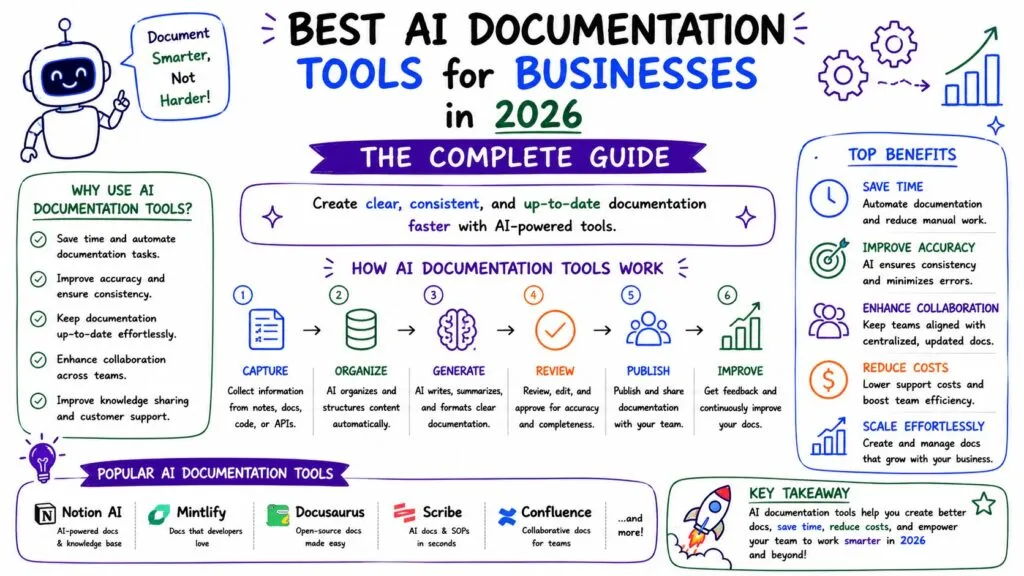
In this guide, we’ll compare six leading AI documentation and knowledge-management platforms for businesses in 2026: Notion AI, Guru, Confluence, Document360, Slite, and Tettra.
If documentation is part of a broader automation initiative, also see our guides to AI Business Process Automation, Best AI Workflow Automation Software, and Best AI Tools for Business.
What Is AI Documentation Software?
AI documentation software uses artificial intelligence to assist with creating, maintaining, organizing, or retrieving business documentation.
Depending on the platform, that can include:
- Drafting documentation and SOPs
- Summarizing long documents
- Improving or rewriting existing content
- Answering questions from internal knowledge
- Finding information across business applications
- Translating documentation
- Detecting outdated information
- Creating FAQs
- Automating documentation workflows
The result is a more accessible company knowledge system and less time spent manually searching for or maintaining information.
This makes AI documentation particularly useful alongside business process automation, where processes need to be documented before they can be standardized and automated.
Best AI Documentation Tools: Quick Comparison
| Tool | Best For | Standout Capability |
|---|---|---|
| Notion AI | All-in-one business workspace | Docs, search, databases and AI |
| Guru | Enterprise knowledge discovery | Permission-aware AI search |
| Confluence | Product & technical teams | Atlassian ecosystem integration |
| Document360 | Customer & product documentation | AI-native knowledge bases |
| Slite | Internal knowledge bases | AI-assisted knowledge maintenance |
| Tettra | Small and growing teams | Simple internal knowledge management |
1. Notion AI — Best Overall for Flexible Business Documentation
Notion is a strong option for businesses wanting documentation, project information, databases, and company knowledge within one workspace.
Notion AI extends the platform with AI-assisted writing and knowledge discovery. Its current AI capabilities include enterprise search, database features, meeting notes, research tools, and an AI agent.
Key Features
- AI writing and editing
- Enterprise search
- Company wikis
- SOP templates
- Databases
- Meeting documentation
- Collaborative workspaces
Pros
- Highly flexible
- Suitable for multiple departments
- Strong combination of documentation and workspace management
- Easy to create interconnected company knowledge
Cons
- Large workspaces require strong organization and governance
- Businesses needing a dedicated external documentation portal may prefer a specialized platform
Best for: Startups, SMBs, agencies, marketing teams, operations teams.
2. Guru — Best for Enterprise Knowledge Search
Guru takes a different approach to documentation by focusing heavily on making existing organizational knowledge easy to discover.
Its enterprise search can connect knowledge from systems such as Google Drive, SharePoint, Slack, Zendesk, Confluence, and CRM platforms while respecting source permissions. Guru also emphasizes cited answers and identifying stale or missing knowledge.
Key Features
- AI enterprise search
- Knowledge verification
- Permission-aware answers
- Multiple business integrations
- Centralized knowledge management
Pros
- Excellent for fragmented company knowledge
- Strong enterprise search capabilities
- Useful for support and revenue teams
- Focus on trusted and governed answers
Cons
- May be more than very small businesses require
- Best value comes when knowledge already exists across multiple systems
Best for: Growing and enterprise businesses with information distributed across many applications.
3. Confluence — Best for Product and Technical Teams
Confluence remains particularly attractive to organizations already working within the Atlassian ecosystem.
AI capabilities in Confluence can help teams research, draft, and refine content, while Rovo connects knowledge across Confluence, Jira and other enterprise applications.
Key Features
- Collaborative documentation
- AI content creation
- Enterprise knowledge search
- Project documentation
- Jira integration
- Templates and structured spaces
Pros
- Excellent Atlassian integration
- Strong choice for engineering and product documentation
- Mature collaboration capabilities
Cons
- Can become complex as workspaces grow
- Teams outside the Atlassian ecosystem may prefer simpler alternatives
Best for: Software companies, IT departments, engineering teams and product organizations.
4. Document360 — Best for Customer-Facing Documentation
Document360 is designed specifically around documentation and knowledge-base management, making it particularly useful for product documentation, help centers, SOPs, user manuals and API documentation.
Its Eddy AI capabilities can write, rewrite, expand, summarize and translate content, generate documentation from multimedia sources, and support intelligent knowledge search.
Key Features
- AI writing assistance
- Knowledge-base management
- API documentation
- SOP creation
- AI search and chatbots
- Translation
- Documentation governance
Pros
- Documentation-first platform
- Strong customer-facing knowledge-base capabilities
- Suitable for structured documentation
- Extensive AI functionality
Cons
- More specialized than general workspaces such as Notion
- May be excessive for teams needing only basic internal SOPs
Best for: SaaS businesses, software companies, customer support organizations and businesses maintaining large external knowledge bases.
5. Slite — Best for Maintaining Internal Knowledge
Slite focuses on creating an internal knowledge base that remains useful after the initial documentation effort.
Its newer AI capabilities can detect knowledge drift across connected tools, propose documentation updates, and send those changes through human review. Slite also supports AI search and document verification.
Key Features
- AI knowledge search
- Documentation verification
- Knowledge maintenance
- Collaborative documents
- Integrations
- AI-assisted writing
Pros
- Clean knowledge-management experience
- Strong focus on documentation accuracy
- Useful for distributed teams
- AI can help identify outdated information
Cons
- Less suited to complex project management
- Specialized focus may require additional business software
Best for: Remote teams, startups and organizations that struggle to keep internal documentation current.
6. Tettra — Best for Simple Team Knowledge Management
Tettra provides a straightforward knowledge-management environment for teams that want to centralize internal processes without introducing an overly complicated platform.
Its Kai AI functionality helps teams manage and retrieve company knowledge, while AI can also generate FAQs from existing Tettra pages.
Key Features
- Internal knowledge base
- Kai AI assistant
- AI-generated FAQs
- Questions and answers
- Content requests
- User permissions
Pros
- Simple approach to knowledge management
- Good fit for internal documentation
- Useful knowledge Q&A features
- Easier adoption for smaller teams
Cons
- Less comprehensive than larger enterprise platforms
- Some AI functionality is tied to paid tiers.
Best for: Small and growing businesses wanting a straightforward company knowledge base.
Best AI Documentation Tool by Use Case
For a general business workspace, Notion AI offers the strongest combination of flexibility and documentation.
For enterprise knowledge discovery, Guru is particularly compelling.
For engineering and product organizations, Confluence makes sense—especially when Jira is already part of the technology stack.
For external product documentation and customer knowledge bases, Document360 is the specialist choice.
For internal documentation that needs continuous maintenance, Slite stands out.
For smaller teams seeking simplicity, Tettra provides a focused alternative.
AI Documentation Automation Example
A business can turn documentation into an automated workflow rather than relying entirely on employees to remember to update manuals.
Process Changed
↓
Workflow Detects or Records Change
↓
AI Creates Documentation Draft
↓
Relevant SOP Identified
↓
Subject-Matter Expert Reviews Draft
↓
Documentation Approved
↓
Knowledge Base Updated
↓
Employees Can Retrieve Updated Answer Through AI Search
This human-in-the-loop approach is particularly valuable because AI accelerates documentation without allowing unverified changes to automatically become company policy.
Businesses interested in automating similar processes should read AI Business Process Automation: Complete Guide and Best AI Workflow Automation Software for Businesses in 2026.
How to Choose AI Documentation Software
Determine Who Will Read the Documentation
Internal employee documentation has different requirements from public customer documentation.
Notion, Guru, Slite and Tettra are strong internal-knowledge options, while Document360 is particularly suitable for structured customer-facing documentation.
Consider Your Existing Software
A company heavily invested in Jira may find Confluence more practical, while a business already organizing work in Notion may not need another documentation platform.
Evaluate AI Search
For large knowledge bases, generating documentation is only half the problem. Employees must also be able to retrieve the correct information quickly.
Look for AI search that provides source references and respects user permissions.
Prioritize Governance
Documentation becomes dangerous when outdated instructions appear authoritative.
Consider:
- Verification workflows
- Permissions
- Document ownership
- Review cycles
- Version history
- Approval processes
Test Integrations
Your documentation platform should ideally connect with tools where knowledge originates, including Slack, Microsoft Teams, CRM platforms, project management software and customer support systems.
How Businesses Can Use AI for SOP Documentation
One particularly valuable use case is AI SOP software.
Instead of writing every standard operating procedure from scratch, businesses can use AI to turn existing process notes, meeting transcripts, or structured instructions into a first draft.
A practical SOP workflow looks like this:
- Capture the existing process.
- Ask AI to structure the information.
- Add responsibilities and decision points.
- Verify every procedural step with the process owner.
- Publish the approved SOP.
- Schedule periodic reviews.
- Update the document whenever the underlying process changes.
This can significantly reduce documentation work while preserving human accountability.
Frequently Asked Questions
What are the best AI documentation tools?
Notion AI, Guru, Confluence, Document360, Slite and Tettra are among the strongest options, but the best platform depends on whether you need internal documentation, enterprise search, SOP management, or customer-facing knowledge bases.
What is AI documentation software?
AI documentation software uses artificial intelligence to help businesses create, organize, search, summarize, maintain and retrieve documentation.
Can AI create SOPs?
Yes. AI can generate initial SOP drafts from structured instructions, transcripts, notes or existing documentation. A knowledgeable employee should verify the final procedure before publication.
What is the best AI knowledge base tool?
Guru is strong for enterprise knowledge discovery, Slite focuses heavily on maintaining accurate internal knowledge, while Document360 is well suited to structured customer-facing knowledge bases.
Can AI automatically update documentation?
Some modern platforms can identify potentially outdated documentation or propose updates. Human approval remains valuable before operational or policy documentation is changed.
Final Verdict
The best AI documentation tool depends less on which platform has the longest feature list and more on where your business knowledge lives and who needs to access it.
Notion AI is our best all-around option for businesses wanting flexible documentation within a broader workspace. Guru is ideal when knowledge is scattered across multiple enterprise applications, while Confluence remains a natural choice for product and technical organizations.
Choose Document360 when customer-facing or product documentation is the priority. Consider Slite when maintaining accurate internal knowledge is the biggest challenge, and Tettra when your business wants a simpler knowledge-management system.
More importantly, treat documentation as part of your wider AI strategy. Connecting your knowledge base with workflow automation and AI agents can turn static documents into operational knowledge that employees—and increasingly AI systems—can actually use.