
Table of Contents
Introduction
Generating leads is rarely the hardest part of modern sales.
The harder problem is turning scattered prospects into qualified sales opportunities without forcing salespeople to spend hours researching companies, checking contact information, scoring prospects, updating CRM records, and sending repetitive outreach.
An AI lead generation workflow solves this by connecting lead capture, research, enrichment, qualification, scoring, personalization, and CRM automation into one repeatable process.
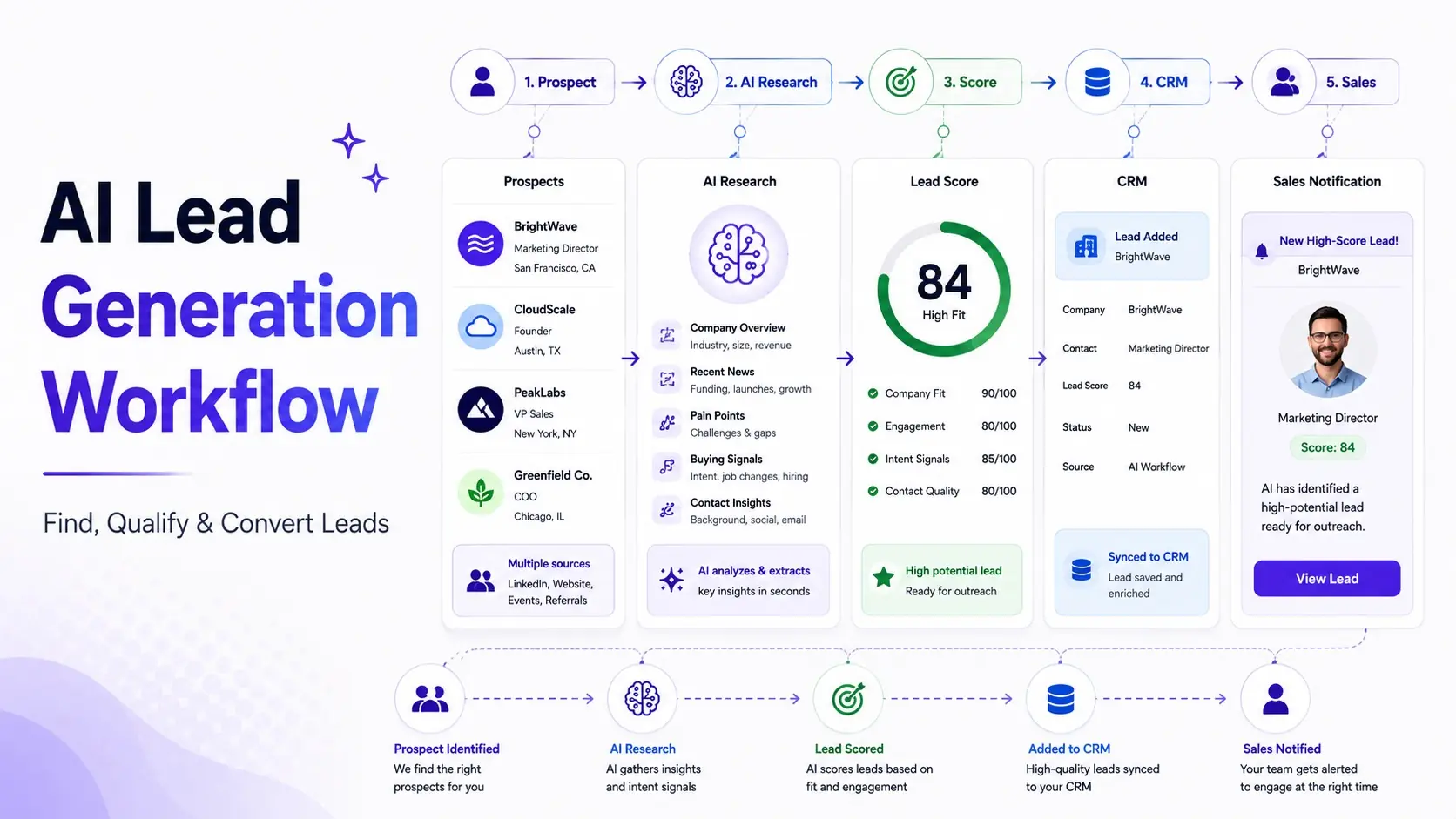
A basic workflow looks like this:
Lead Source → Capture → Enrich → Research → Qualify → Score → Personalize → Outreach → CRM → Sales Handoff
The goal isn’t to let AI spam thousands of prospects.
The goal is to use AI to find better prospects, understand them faster, prioritize them intelligently, and give salespeople more time for actual conversations.
Quick Answer
An AI lead generation workflow uses artificial intelligence and automation to identify potential customers, collect and enrich prospect information, evaluate fit and intent, prioritize leads, personalize outreach, and route qualified opportunities to sales.
A practical workflow is:
Lead Source
     ↓
Lead Capture
     ↓
Data Enrichment
     ↓
Company + Prospect Research
     ↓
ICP Qualification
     ↓
AI Lead Scoring
     ↓
Personalized Outreach
     ↓
Engagement Tracking
     ↓
CRM Update
     ↓
Sales Handoff
For most businesses, the best starting point isn’t fully autonomous prospecting.
Start by automating research, enrichment, scoring, and CRM administration, while keeping human control over messaging strategy and high-value sales conversations.
What Is an AI Lead Generation Workflow?
An AI lead generation workflow is a sequence of automated steps that uses AI to identify and process potential customers before, during, and after they enter your sales pipeline.
Traditional lead generation often looks like:
Find prospect → Research manually → Enter CRM → Write email → Follow up → Qualify
An AI-powered approach can become:
Find prospects → Enrich automatically → Research with AI → Score → Personalize → Automate follow-up → Route qualified leads
The biggest benefit isn’t necessarily sending more emails.
It’s reducing the amount of manual research and administrative work required for every opportunity.
Salesforce’s current AI lead-generation guidance similarly emphasizes using AI to identify prospects, personalize engagement, analyze customer data, and improve sales productivity.
How AI Changes Lead Generation
AI can help across nearly every stage of lead generation.
| Activity | Traditional | AI-Assisted |
|---|---|---|
| Prospect research | Manual | Automated |
| Company research | Manual | AI summary |
| Data enrichment | Manual | Automated |
| Lead qualification | Rules/spreadsheets | AI + rules |
| Lead scoring | Static | Dynamic |
| Personalization | Manual | AI-generated |
| Follow-up | Manual | Automated |
| CRM updates | Manual | Automated |
| Lead routing | Rules | AI + rules |
| Reporting | Manual | Automated insights |
But there is an important distinction:
AI should improve the decision-making process, not remove every human decision.
The Complete AI Lead Generation Workflow
Here’s the complete architecture:
                    ┌───────────────┐
                    │ Lead Sources  │
                    └───────┬───────┘
                            ↓
                    ┌───────────────┐
                    │ Lead Capture  │
                    └───────┬───────┘
                            ↓
                    ┌───────────────┐
                    │ Data Enrich   │
                    └───────┬───────┘
                            ↓
                 ┌─────────────────────┐
                 │ AI Prospect Research│
                 └──────────┬──────────┘
                            ↓
                    ┌───────────────┐
                    │ Qualification │
                    └───────┬───────┘
                            ↓
                     ┌────────────┐
                     │ AI Scoring │
                     └─────┬──────┘
                           ↓
                   ┌──────────────┐
                   │ Personalize  │
                   └──────┬───────┘
                          ↓
                    ┌───────────┐
                    │ Outreach  │
                    └─────┬─────┘
                          ↓
                  ┌───────────────┐
                  │ Engagement    │
                  │ Tracking      │
                  └───────┬───────┘
                          ↓
                     ┌────────┐
                     │  CRM   │
                     └───┬────┘
                         ↓
                 ┌──────────────┐
                 │ Sales Handoff│
                 └──────────────┘
Now let’s break down each stage.
Step 1: Define Your Ideal Customer Profile
Before using AI, define who you’re trying to find.
Your Ideal Customer Profile, or ICP, should describe the companies most likely to become successful customers.
Consider:
- Industry
- Company size
- Revenue
- Geography
- Business model
- Technology stack
- Growth stage
- Number of employees
- Existing problems
- Buying triggers
Then define the buyer.
For example:
Company
- B2B SaaS
- 50–500 employees
- North America
- Growing sales team
Buyer
- VP Sales
- Head of Revenue
- Sales Operations Director
Problem
- Too much manual lead research
- Poor lead prioritization
- Slow follow-up
Your AI workflow needs this information because otherwise it may optimize for quantity instead of fit.
Step 2: Capture Leads
Lead sources can include:
- Website forms
- Landing pages
- Search
- Webinars
- Events
- Referrals
- Content downloads
- Product signups
- Outbound prospecting
- Paid campaigns
The workflow should send new leads into a central system.
For example:
Website Form
     ↓
CRM
     ↓
Automation
     ↓
Enrichment
The same architecture can work for multiple lead sources.
Step 3: Enrich Lead Data
A name and email address aren’t enough.
Your workflow should ideally collect information such as:
Company Data
- Industry
- Employee count
- Revenue range
- Location
- Website
- Technology
- Growth signals
Contact Data
- Job title
- Department
- Seniority
- LinkedIn profile
- Contact information
Intent Signals
- Website activity
- Content downloads
- Demo requests
- Product activity
- Search behavior
- Engagement
AI can then summarize this information.
Instead of giving a salesperson 20 data fields:
Company: Example Corp
Employees: 180
Industry: SaaS
Growth: Hiring sales reps
Signal: Recently expanded into Europe
Likely problem: Scaling outbound sales
The salesperson receives a usable prospect brief.
Step 4: Research Prospects With AI
This is one of the strongest AI use cases.
AI can turn raw company information into a concise research summary.
For example:
Company: Example Corp
Business: B2B SaaS
Size: 180 employees
Growth signal: 23 open sales positions
Technology: HubSpot + Slack
Potential challenge: Scaling sales operations
Reason to contact: Rapid sales-team expansion
The workflow can then use that information to determine whether the prospect deserves sales attention.
Step 5: Qualify Leads
Not every lead should enter the sales pipeline.
Create explicit qualification criteria.
For example:
Strong Fit
- Target industry
- Target company size
- Correct geography
- Decision-maker
- Relevant problem
Medium Fit
- Some ICP characteristics
- Relevant role
- Problem unclear
Poor Fit
- Outside target industry
- Too small
- Wrong geography
- No relevant use case
AI can classify leads against these criteria.
But keep your rules visible.
A salesperson should be able to understand why a lead was classified as qualified.
Step 6: Build an AI Lead Scoring Model
A simple scoring model might look like this:
| Signal | Points |
|---|---|
| Target industry | +20 |
| Target company size | +15 |
| Decision-maker | +20 |
| Strong intent signal | +20 |
| Relevant technology | +10 |
| Recent company growth | +10 |
| Engaged with content | +5 |
| Poor ICP fit | -20 |
Example
A prospect receives:
- Industry: +20
- Company size: +15
- Decision-maker: +20
- Intent: +20
- Technology: +10
- Growth: +10
Total = 95/100
That should be a high-priority lead.
Another prospect might score:
38/100
That lead shouldn’t receive the same sales attention.
The important part is to calibrate the scoring model against actual conversion data.
Don’t assume that every signal has equal predictive power.
Step 7: Personalize Outreach
Once a prospect is qualified, AI can help create personalized outreach.
Bad personalization:
Hi John, I saw that your company is growing and thought our solution might help.
That’s essentially generic.
Better personalization connects a specific signal to a business problem:
Your team appears to be expanding its sales organization across multiple regions. That often creates challenges around lead routing and qualification as volume increases.
The AI should use verified research rather than inventing facts.
Step 8: Automate Follow-Up
A lead-generation workflow shouldn’t stop after one message.
A basic sequence could be:
Day 0
Initial outreach
     ↓
No response
     ↓
Day 3
Useful resource
     ↓
No response
     ↓
Day 7
Problem-focused follow-up
     ↓
No response
     ↓
Day 14
Final message
But not every lead should receive the same sequence.
High-intent lead
Human sales intervention
Medium-intent lead
Personalized automated sequence
Low-intent lead
Nurture campaign
This is where lead scoring and outreach automation work together.
Step 9: Connect Your CRM
Your CRM should remain the source of truth.
The workflow should automatically update:
- Lead status
- Lead score
- Qualification
- Company data
- Contact data
- Last activity
- Engagement
- Sales owner
- Next action
For example:
AI identifies qualified lead
        ↓
Score > 75
        ↓
CRM status = Sales Qualified
        ↓
Assign sales representative
        ↓
Create task
        ↓
Notify salesperson
This prevents qualified leads from disappearing into automation tools.
Inbound AI Lead Generation Workflow
Inbound and outbound lead generation should not use exactly the same process.
For inbound:
Website Visitor
      ↓
Content / Landing Page
      ↓
Form / Demo Request
      ↓
CRM
      ↓
Enrichment
      ↓
AI Qualification
      ↓
Lead Score
      ↓
High Score?
   ↙       ↘
Yes       No
  ↓         ↓
Sales     Nurture
  ↓
Human Follow-up
The advantage is that inbound leads often already demonstrate some level of intent.
A demo request from a target account deserves much more attention than someone who simply downloaded a generic PDF.
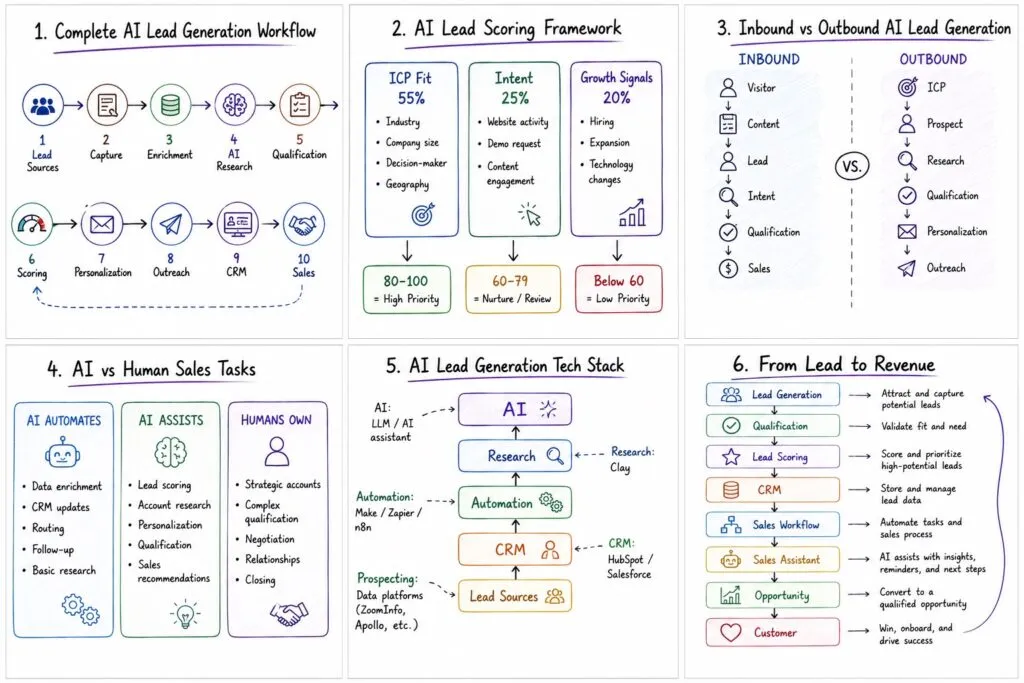
Outbound AI Lead Generation Workflow
Outbound starts with identifying potential prospects.
ICP
 ↓
Find Accounts
 ↓
Identify Decision Makers
 ↓
Enrich Data
 ↓
AI Research
 ↓
Qualification
 ↓
Lead Score
 ↓
Personalization
 ↓
Outreach
 ↓
Engagement
 ↓
CRM
 ↓
Sales Handoff
This is where tools such as Clay, Apollo, LinkedIn-based prospecting systems, CRM platforms, and automation tools can become useful.
Clay’s current AI lead-generation material emphasizes combining data enrichment, AI research, and workflow automation to build prospecting systems.
What Should AI Automate?
Use this framework before automating your sales process.
| Task | Automate | AI Assist | Human |
|---|---|---|---|
| Data enrichment | ✅ | ||
| Company research | ✅ | ||
| Lead scoring | ✅ | Review | |
| CRM updates | ✅ | ||
| Lead routing | ✅ | ||
| Email drafting | ✅ | Review | |
| Follow-up | ✅ | ||
| High-value outreach | ✅ | ✅ | |
| Sales qualification | ✅ | ✅ | |
| Negotiation | ✅ | ||
| Closing | ✅ |
The rule:
Automate repetitive work. Use AI for analysis. Keep important sales decisions human.
Best Software for an AI Lead Generation Workflow
You don’t necessarily need one platform.
A typical stack could include:
| Layer | Example Tools |
|---|---|
| CRM | HubSpot, Salesforce |
| Prospect data | Apollo, Clay |
| Automation | Make, Zapier, n8n |
| AI research | Clay, ChatGPT |
| Outreach | Sales engagement platform |
| Analytics | CRM + reporting |
| Lead scoring | CRM / AI workflow |
| Forms | Website / CRM forms |
Best for flexible automation
Make
Best for no-code automation
Zapier
Best for technical teams
n8n
Best for AI-powered prospect research
Clay
Best for CRM-centered lead generation
HubSpot
Don’t select software based purely on the number of integrations.
Select it based on the workflow you actually need.
How to Build the Workflow
Step 1: Document Your Current Process
Write down every step from:
New prospect → Qualified opportunity
Identify where salespeople spend time.
Step 2: Find Your Biggest Bottleneck
Is it:
- Finding prospects?
- Research?
- Data entry?
- Qualification?
- Follow-up?
- Lead routing?
Automate the biggest bottleneck first.
Step 3: Define Your ICP
Create explicit qualification criteria.
Step 4: Choose Your Data Sources
Determine where company and contact information will come from.
Step 5: Build the CRM Workflow
Make sure every lead has a destination.
Step 6: Add Enrichment
Automatically populate missing information.
Step 7: Add AI Research
Generate standardized prospect summaries.
Step 8: Add Lead Scoring
Create transparent qualification rules.
Step 9: Add Personalization
Use verified prospect information to improve outreach.
Step 10: Add Human Review
Require approval for high-value or sensitive communications.
Step 11: Measure
Track conversion and efficiency.
A Simple AI Lead Generation Workflow for Small Businesses
You don’t need an enterprise technology stack.
A small business could start with:
Website → HubSpot → Make → AI → CRM
Example:
Website Lead
     ↓
HubSpot
     ↓
Make
     ↓
AI Research
     ↓
Qualification
     ↓
Score
     ↓
CRM Update
     ↓
Sales Notification
That alone can eliminate significant manual administration.
Once it works, add:
- Automated enrichment
- Personalized outreach
- Lead nurturing
- Engagement scoring
- Automated routing
This follows the same principle as the broader Best AI Workflows for Small Businesses guide: start with a repeatable process, automate the repetitive parts, and expand only after the basic workflow is reliable.
How to Measure AI Lead Generation ROI
Track four categories.
Lead Metrics
- Leads generated
- Qualified leads
- Sales-qualified leads
- Cost per lead
- Lead-to-opportunity rate
Sales Metrics
- Meetings booked
- Opportunity rate
- Conversion rate
- Sales cycle length
- Pipeline generated
Productivity Metrics
- Research hours saved
- CRM administration time
- Leads processed per salesperson
- Follow-ups automated
Revenue Metrics
- Pipeline value
- Revenue generated
- Customer acquisition cost
- Revenue per salesperson
A useful calculation is:
Lead Generation ROI = Revenue Attributed to Workflow − Workflow Cost
Then compare that with the original process.
For example, if automation produces 30 additional qualified opportunities and five become customers, you can compare the resulting revenue with:
- Software costs
- Implementation time
- AI costs
- Sales-team time
Don’t measure success simply by the number of leads.
Qualified pipeline is more important than raw lead volume.
Common AI Lead Generation Mistakes
Automating Before Defining the ICP
AI can generate thousands of prospects.
That doesn’t mean they’re useful.
Optimizing for Lead Volume
A workflow producing 10,000 poor leads is worse than one producing 300 highly relevant prospects.
Using Unverified Data
AI-generated research must be grounded in reliable information.
Writing Fake Personalization
Never allow AI to invent:
- Company announcements
- Funding
- Job changes
- Product launches
- Customer relationships
Sending Everything Automatically
High-value accounts deserve human review.
Ignoring the CRM
If your automation generates leads but doesn’t update your CRM correctly, you’ve created another silo.
Never Updating Your Scoring Model
Your scoring system should evolve based on actual conversion data.
AI Lead Generation vs AI Lead Qualification
These concepts are closely related but different.
AI Lead Generation
Finds potential customers.
AI Lead Qualification
Determines which prospects are worth pursuing.
The relationship is:
AI Lead Generation
       ↓
Potential Prospects
       ↓
AI Lead Qualification
       ↓
Qualified Leads
       ↓
AI Lead Scoring
       ↓
Sales
Your AI Lead Qualification page should therefore be treated as a natural next step after this article. It can go deeper into prospect scoring, qualification frameworks, and AI qualification software.
Next Step
Already generating leads but struggling to determine which ones deserve sales attention?
Read AI Lead Qualification: How Businesses Can Automate Prospect Scoring for the next stage of the workflow.
How AI Lead Generation Connects to Your Sales System
Lead generation shouldn’t operate as a separate automation island.
A mature system looks like:
Lead Generation
       ↓
Lead Qualification
       ↓
Lead Scoring
       ↓
CRM
       ↓
Sales Workflow
       ↓
Sales Assistant / AI Agent
       ↓
Opportunity
       ↓
Customer Success
That means your lead-generation workflow should connect directly with your broader sales architecture.
See: AI Sales Workflow: The Complete Guide for Modern Businesses
for the next layer.
Frequently Asked Questions
What is an AI lead generation workflow?
An AI lead generation workflow is an automated process that uses AI to identify prospects, enrich data, research companies, qualify leads, score prospects, personalize outreach, and route qualified opportunities to sales.
How does AI automate lead generation?
AI can automate prospect research, data enrichment, qualification, lead scoring, personalization, follow-up, CRM updates, and lead routing.
What is the best AI lead generation tool?
There isn’t one universal tool. Clay is strong for AI-powered prospect research and enrichment, HubSpot is useful for CRM-centered workflows, Make and Zapier are strong automation layers, and n8n is attractive for technical teams that want greater control.
Can AI generate qualified leads?
AI can help identify and prioritize qualified leads, but qualification quality depends on the ICP, data quality, scoring model, and workflow design.
How does AI lead generation work with a CRM?
The CRM can serve as the central system of record. AI and automation tools enrich records, calculate scores, update statuses, assign owners, create tasks, and trigger follow-up workflows.
Is AI lead generation useful for small businesses?
Yes. Small businesses can start with a simple workflow connecting their website, CRM, automation platform, and AI research tool. The objective should be reducing manual work and improving lead quality rather than creating massive lead volumes.
Can AI replace sales development representatives?
AI can automate significant portions of prospect research, data enrichment, qualification, and routine outreach. However, human salespeople remain important for relationship building, complex qualification, negotiation, and closing.
Final Verdict
The best AI lead generation workflow isn’t the one that produces the most leads.
It’s the one that consistently turns the right prospects into qualified sales conversations.
A strong system follows this sequence:
Define ICP
↓
Find prospects
↓
Capture leads
↓
Enrich data
↓
Research with AI
↓
Qualify
↓
Score
↓
Personalize
↓
Follow up
↓
Update CRM
↓
Sales handoff
The biggest opportunity is usually not replacing your sales team.
It’s removing the repetitive work that prevents them from selling.
Let AI research accounts.
Let automation move data.
Let scoring prioritize opportunities.
Let workflows handle predictable follow-up.
Then let salespeople focus on the activities where human judgment creates the most value.
As the system matures, connect lead generation to AI lead qualification, your AI sales workflow, your CRM, and eventually AI sales agents.
That turns lead generation from a collection of disconnected tools into a repeatable AI-powered revenue workflow.
Related Articles
AI Lead Generation Workflow: How to Automate Lead Generation
Learn how to build an AI lead generation workflow that captures, researches, qualifies, scores, and routes leads automatically while keeping sales teams in control.
AI Customer Success Automation: The Complete Guide for Businesses in 2026
Learn how AI customer success automation can streamline onboarding, health scoring, churn prevention, renewals, and customer engagement while helping CSMs focus on high-value relationships.
How to Build an AI Knowledge Base for Your Business (2026)
Learn how to build an AI knowledge base for your business. Follow this step-by-step implementation guide to create an internal AI knowledge base, automate knowledge management, and improve employee productivity.
AI Knowledge Management: The Complete Guide for Businesses (2026)
Learn how to implement AI knowledge management in your business. Discover AI knowledge management systems, workflows, knowledge automation, enterprise search, and best practices.
AI Business Process Automation: Complete Guide (2026)
Learn how AI business process automation helps businesses automate sales, HR, finance, customer support, marketing, and operations. Discover implementation steps, workflow examples, ROI, and the best AI automation software.